
ವಿವರಣೆ
Going on holiday, closing over Christmas and New Year, doing a stock-take, selling only in season or taking orders only during opening hours? Disable Sales for WooCommerce closes the shop for the period you choose and opens it again by itself – no need to set products out of stock or switch the shop to maintenance mode.
Closed over Christmas? Set 24 December to 1 January once, tick “Repeat” and your shop closes and reopens on its own every year. Customers can still browse, they just cannot order – and they see when you are back.
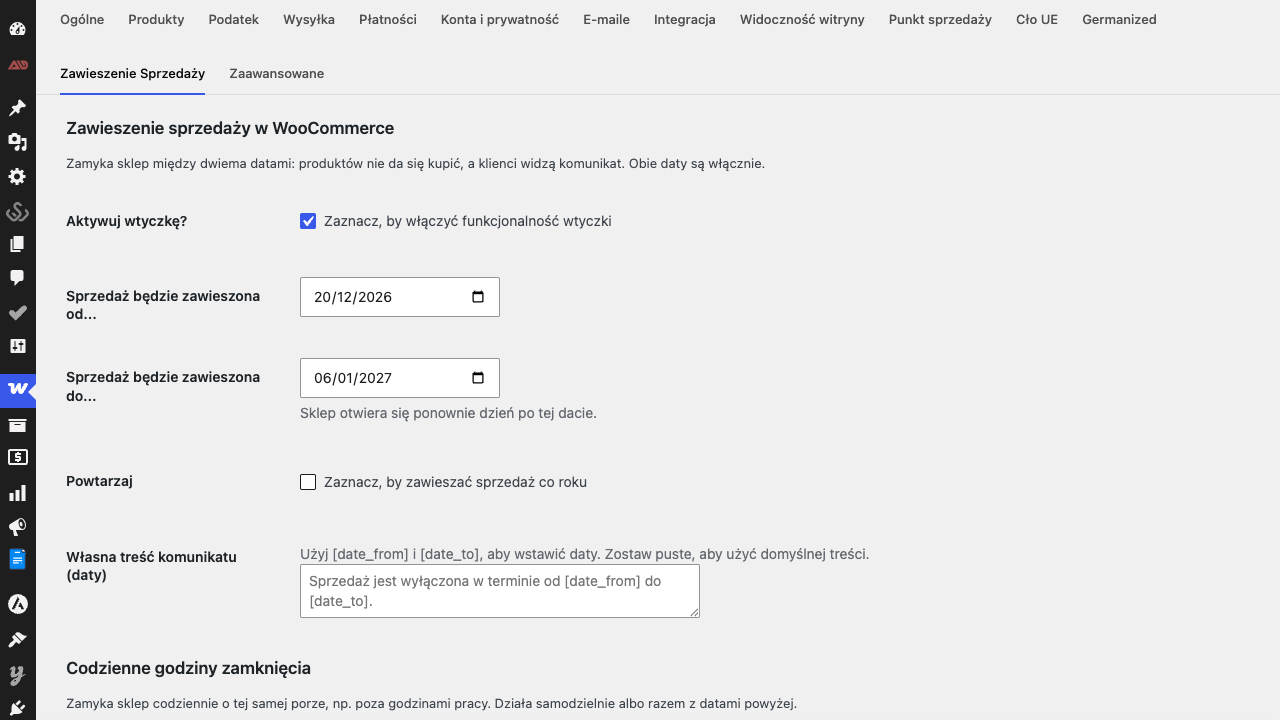
- Pick a first and a last closed day; both are included, the shop reopens the day after.
- Repeat the same period every year (also across New Year, e.g. 20 December to 6 January) – or use it for seasonal selling, e.g. Christmas trees only from late November to Christmas Eve.
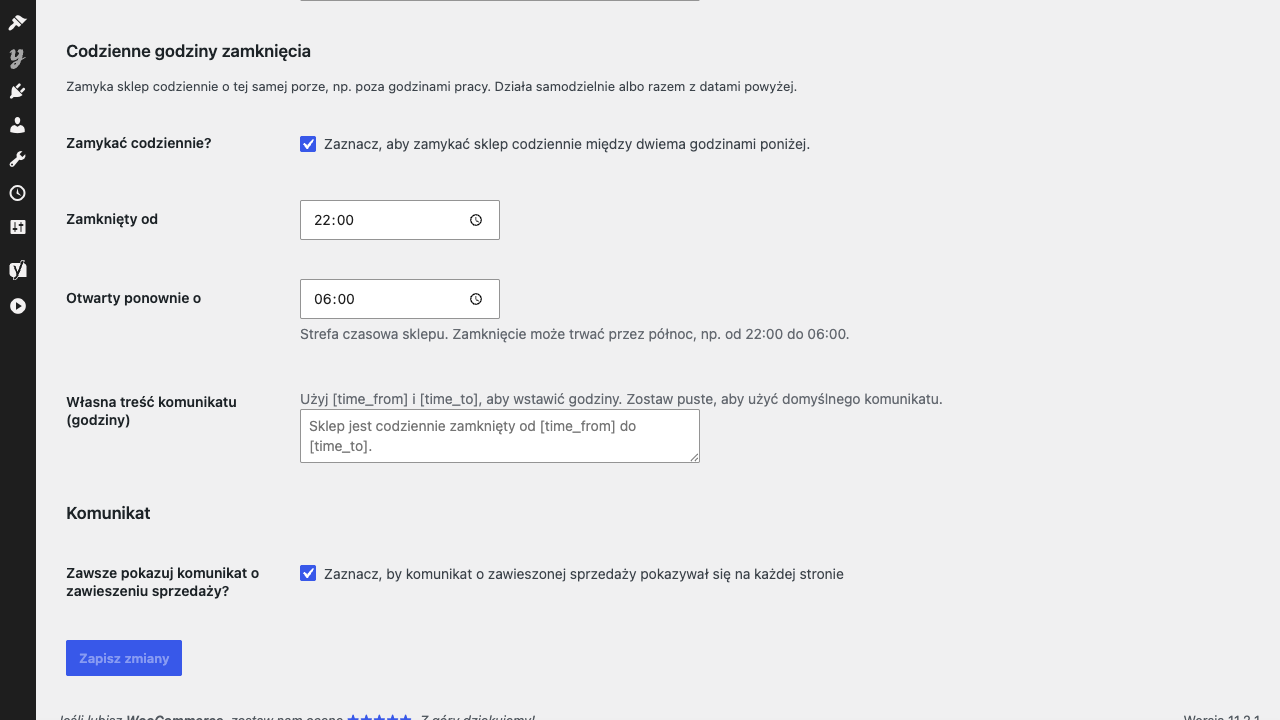
- Close the shop every day between two times, e.g. 22:00 to 06:00 or outside your delivery hours; closing hours may cross midnight.
- While closed, no product can be added to the cart and existing carts cannot be checked out.
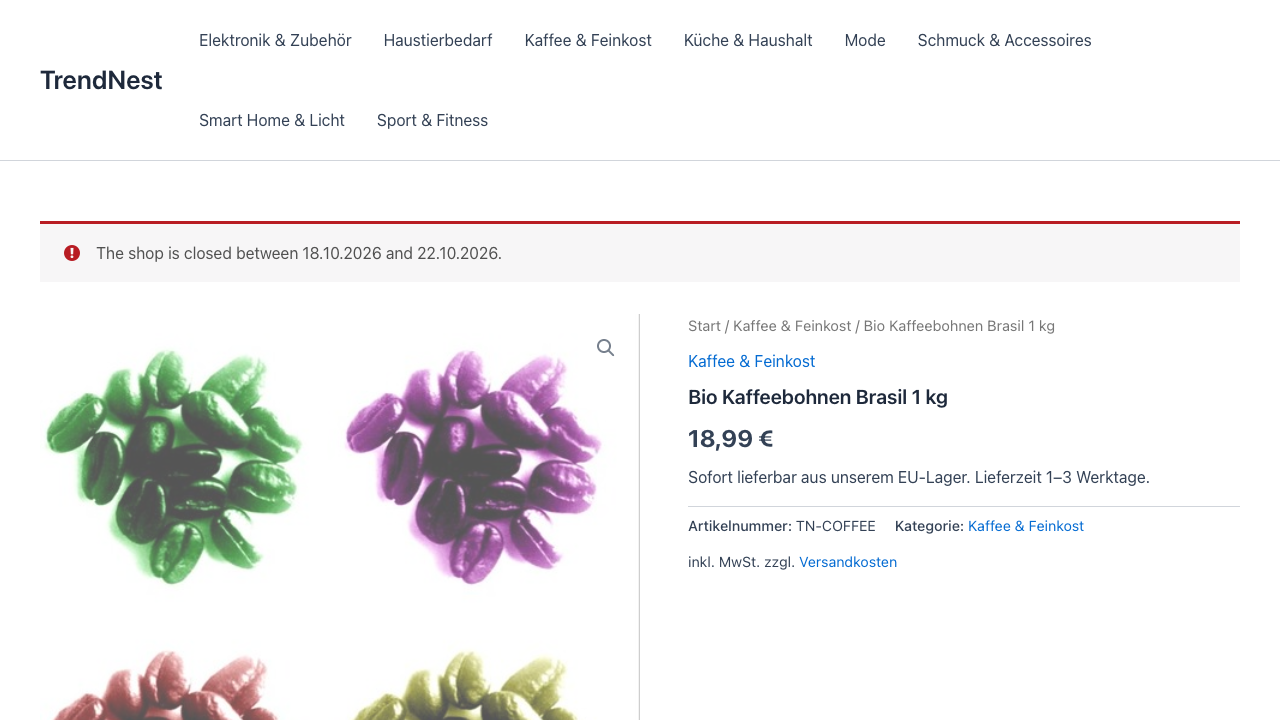
- Customers see a WooCommerce-style notice on the cart and checkout – or on every page, if you want.
- Write your own notice texts, with
[date_from]/[date_to]for the dates and[time_from]/[time_to]for the daily hours. - Works with the classic cart and checkout and with the cart and checkout blocks; compatible with high-performance order storage (HPOS).
- Dates and times use your shop’s timezone, date and time format.
Settings: WooCommerce Settings Disable Sales.
Disable Sales Pro
Need more than one period? The Disable Sales Pro add-on adds a weekly schedule with the public holidays of 14 EU countries, several planned closures, orders during a pause with a shipping date, closing only selected products, categories or delivery countries, an access link for wholesale and regular customers, and a banner with a countdown.
This plugin is maintained by Regelkit, makers of EU compliance plugins for WooCommerce.
ಸ್ಕ್ರೀನ್ಶಾಟ್ಗಳು
ಸ್ಥಾಪನೆ
- Install from the WordPress plugin directory or upload
wc-disable-salesto/wp-content/plugins/. - Activate the plugin through the Plugins menu.
- Go to WooCommerce Settings Disable Sales, enable the plugin and set the dates and/or the daily closing hours.
FAQ
-
Is the “until” date included?
-
Yes. If you close the shop until 15 August, customers can buy again on 16 August at midnight (shop timezone).
-
What do customers see?
-
Products show as not purchasable (no add-to-cart button), and the cart and checkout show a notice with your dates. With “Always show notice” the notice appears on every page of the shop.
-
Does it work with the cart and checkout blocks?
-
Yes. With the block-based cart and checkout the closed shop is reported as a cart error, which prevents checkout.
-
Can I repeat the closure every year?
-
Yes, tick “Repeat”. The same days are used every year, including periods that cross New Year.
-
Can I close the shop every day, e.g. at night?
-
Yes. Tick “Close every day” and set the closing and reopening time, e.g. 22:00 and 06:00. The shop timezone is used. Daily hours work on their own or together with the closing dates.
-
How do I close my shop over Christmas and New Year?
-
Choose the first and the last closed day, e.g. 24 December and 1 January, and tick “Repeat”. The period may cross New Year; the shop reopens on 2 January and does the same every year. Write your own notice, e.g. “We are on holiday until [date_to] – orders are possible again from 2 January.”
-
Can I sell only in season?
-
Yes. Close the shop for the rest of the year and tick “Repeat”: for Christmas trees sold from 25 November to 24 December, close it from 25 December to 24 November.
-
Are existing orders affected?
-
No. Only new purchases are blocked; orders, subscriptions and the admin area work as usual.
ವಿಮರ್ಶೆಗಳು
ಈ ಪ್ಲಗಿನ್ಗೆ ಯಾವುದೇ ವಿಮರ್ಶೆಗಳಿಲ್ಲ.
ಕೊಡುಗೆದಾರರು & ಡೆವಲಪರ್ಗಳು
“Disable Sales for WooCommerce” ಓಪನ್ ಸೋರ್ಸ್ ಸಾಫ್ಟ್ವೇರ್ ಆಗಿದೆ. ಕೆಳಗಿನ ಜನರು ಈ ಪ್ಲಗಿನ್ಗೆ ಕೊಡುಗೆ ನೀಡಿದ್ದಾರೆ.
ಕೊಡುಗೆದಾರರು
“Disable Sales for WooCommerce” ಅನ್ನು ನಿಮ್ಮ ಭಾಷೆಗೆ ಅನುವಾದಿಸಿ.
ಅಭಿವೃದ್ಧಿಯಲ್ಲಿ ಆಸಕ್ತಿ ಇದೆಯೇ?
ಕೋಡ್ ಬ್ರೌಸ್ ಮಾಡಿ, SVN ರೆಪೊಸಿಟರಿ ಪರಿಶೀಲಿಸಿ, ಅಥವಾ ಅಭಿವೃದ್ಧಿ ಲಾಗ್ ಗೆ RSS ಚಂದಾದಾರರಾಗಿ.
Changelog
1.2.1
- After two weeks of use the settings page asks once for a review on WordPress.org (with “Maybe later” and “Don’t ask again”). It never appears anywhere else.
- The new texts are translated into all bundled languages.
1.2.0
- New: daily closing hours – close the shop every day between two times (also across midnight), with its own notice text using [time_from] and [time_to].
1.1.0
- Tested with WordPress 7.1 and WooCommerce 11.2; declares compatibility with HPOS and the cart/checkout blocks.
- Block cart and checkout: the closed shop is reported as a cart error.
- Fixed: the notice was not shown on the classic cart and checkout.
- The “until” date is now included (the shop reopens the day after); dates use the shop’s timezone and date format.
- Yearly repeats that cross New Year are handled correctly.
- German translation; Polish translation completed.
- All strings translatable and escaped; licence is GPL-2.0-or-later in the plugin header and readme.
- Unit tests for the closing periods.
1.0.8
- Add load_plugin_textdomain hook
1.0.7
- Do not use variable as textdomain
- Cleanup languages
1.0.6
- Add translations.
1.0.5
- Fix plugin versions.
1.0.4
- Add plugin icon.
1.0.3
- Fix screenshots in readme.
1.0.2
- Renamed the plugin.
1.0.1
- Add screenshots.
1.0.0
- Created a working plugin.