
ವಿವರಣೆ
Fresh content and solid SEO are what get a small business found on Google. Most owners never have time for either. PageOne handles both from inside WordPress.
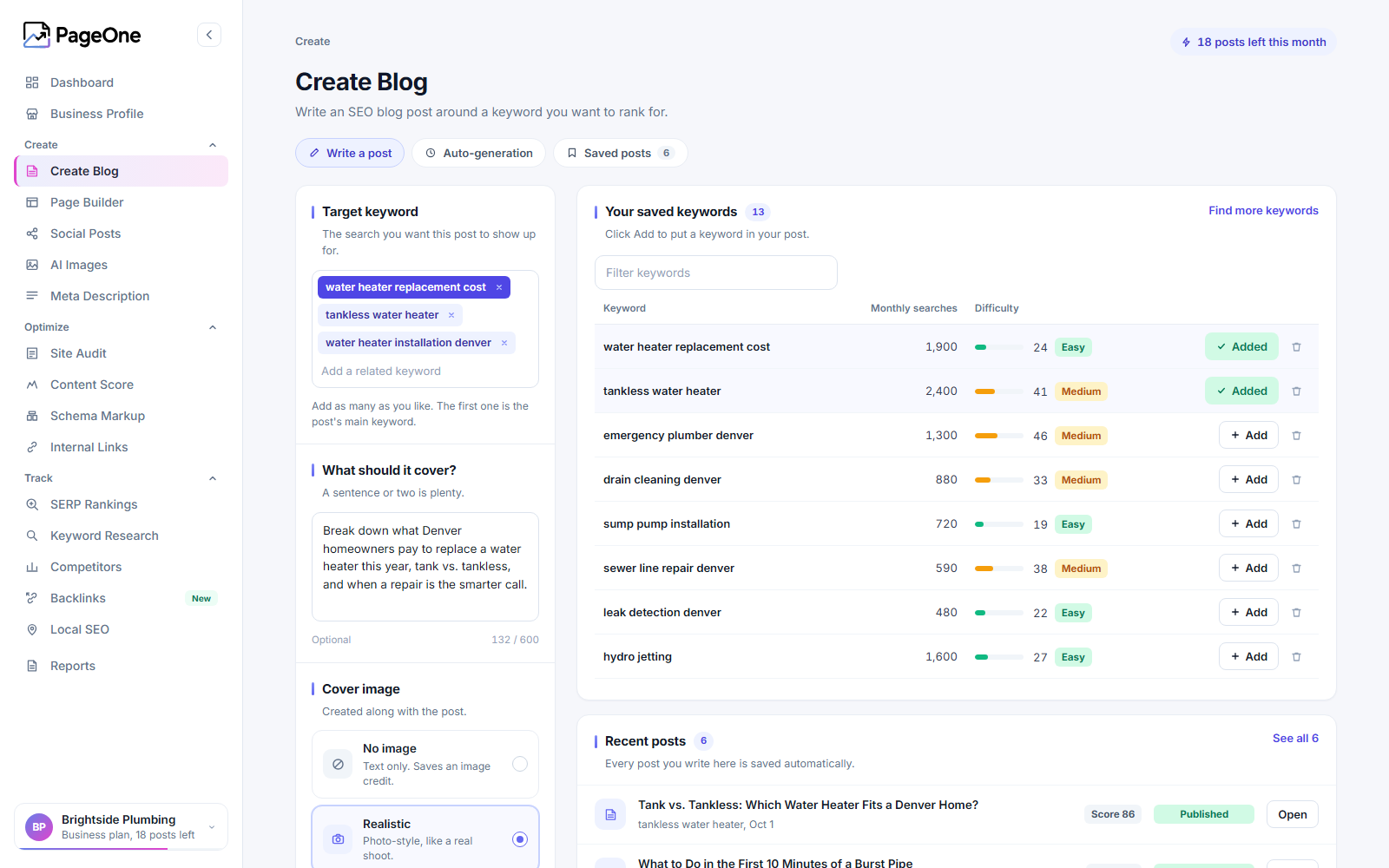
It writes your blog for you. Choose the keywords you want to be found for and how often you want to post. PageOne writes SEO blog posts with cover images and publishes them to your site on that schedule, or saves them as drafts so you can read them first.
It is a complete SEO plugin, and that part is free. Titles and descriptions, structured data, sitemaps, redirects and an SEO panel in the post editor all run on your own site at no cost. Already using Yoast SEO, Rank Math, SEOPress or All in One SEO? PageOne works alongside it, and a guided migration moves you over when you are ready.
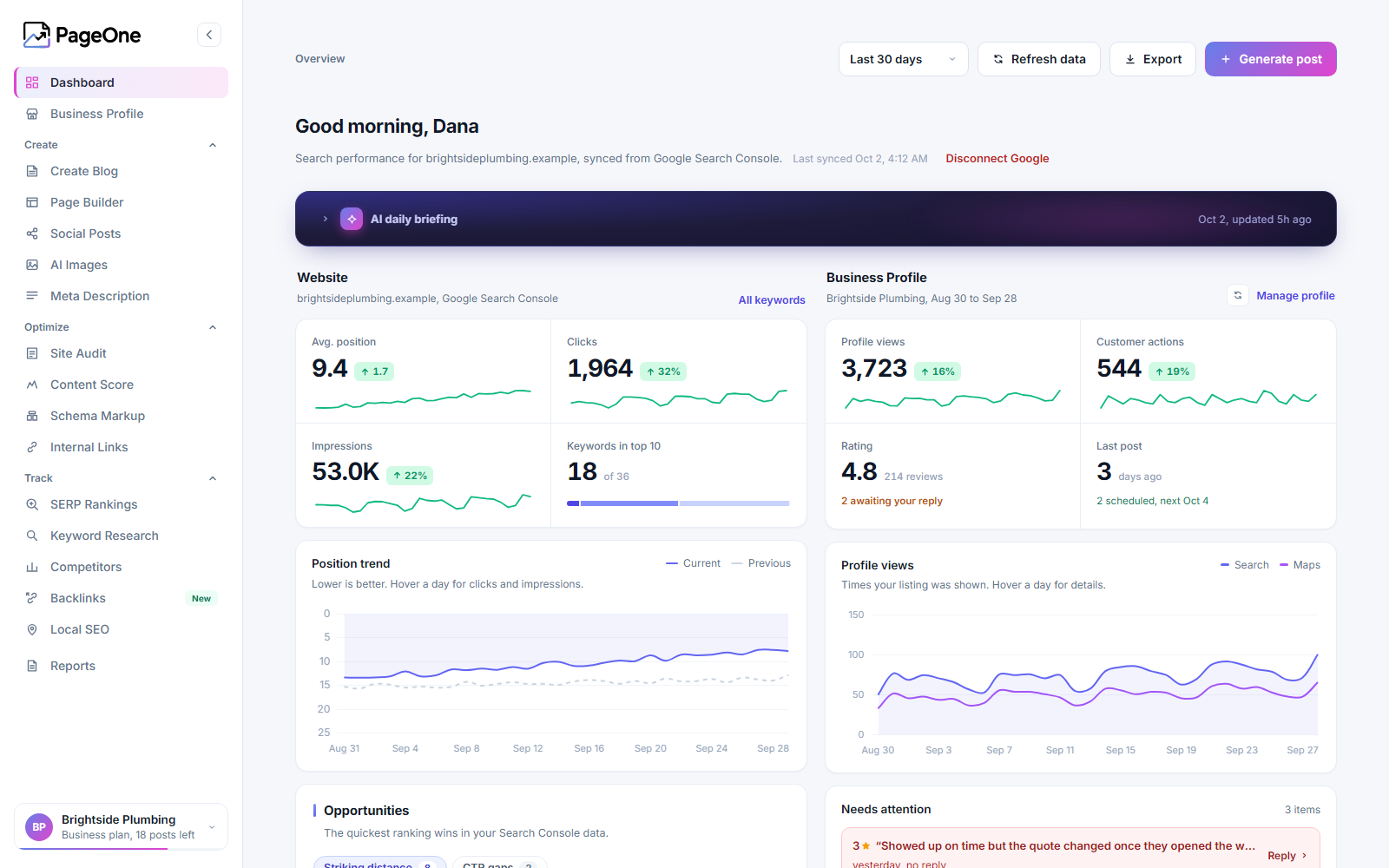
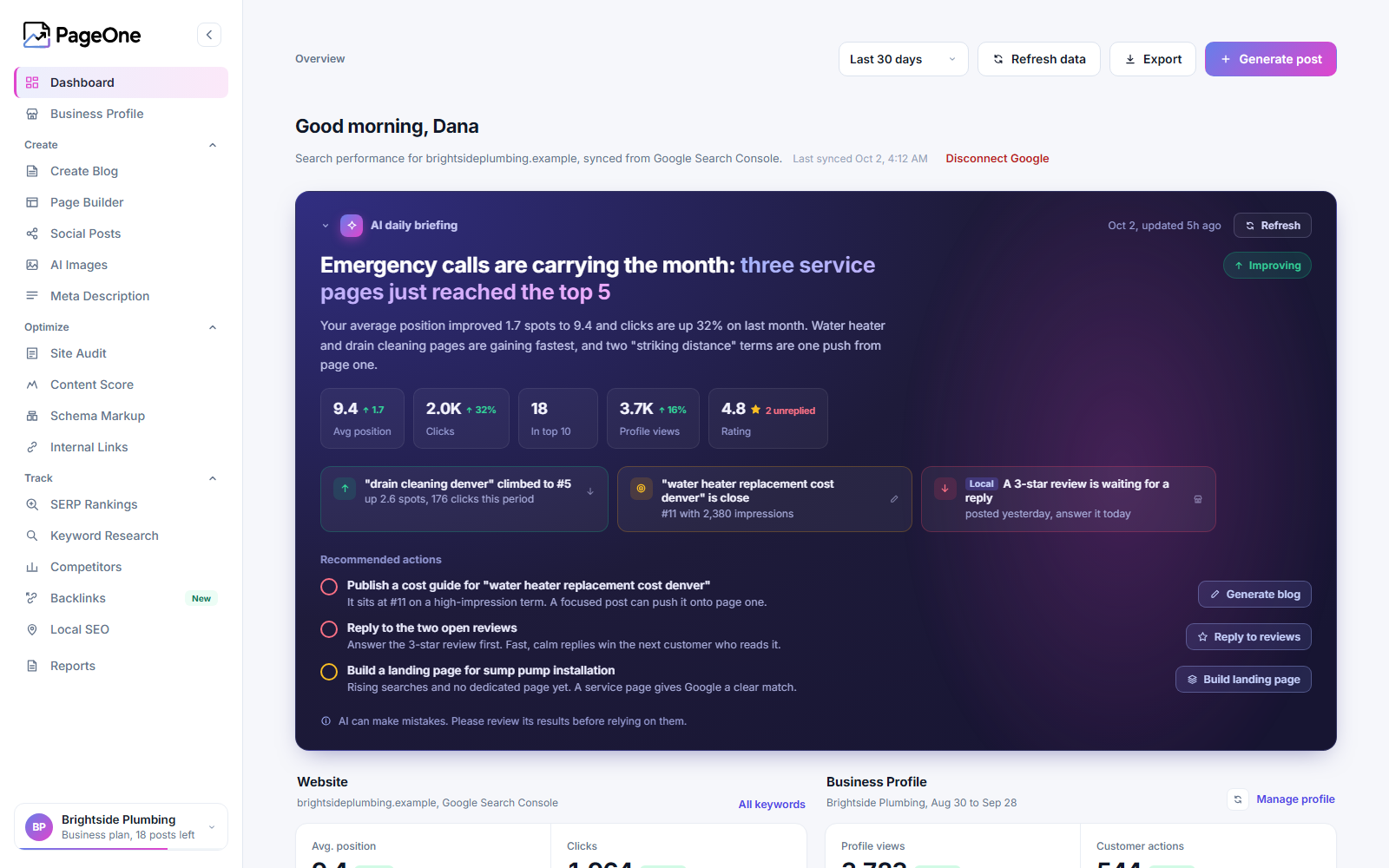
It shows you what is working. Your Google Search Console results and your Google Business Profile sit side by side in one dashboard, with a daily briefing on what changed and what to do next.
Blogging on autopilot
- Scheduled blog posts written around your target keywords, with optional AI cover images
- Publish automatically, or save each post as a draft to review first
- Write a single post any time you need one
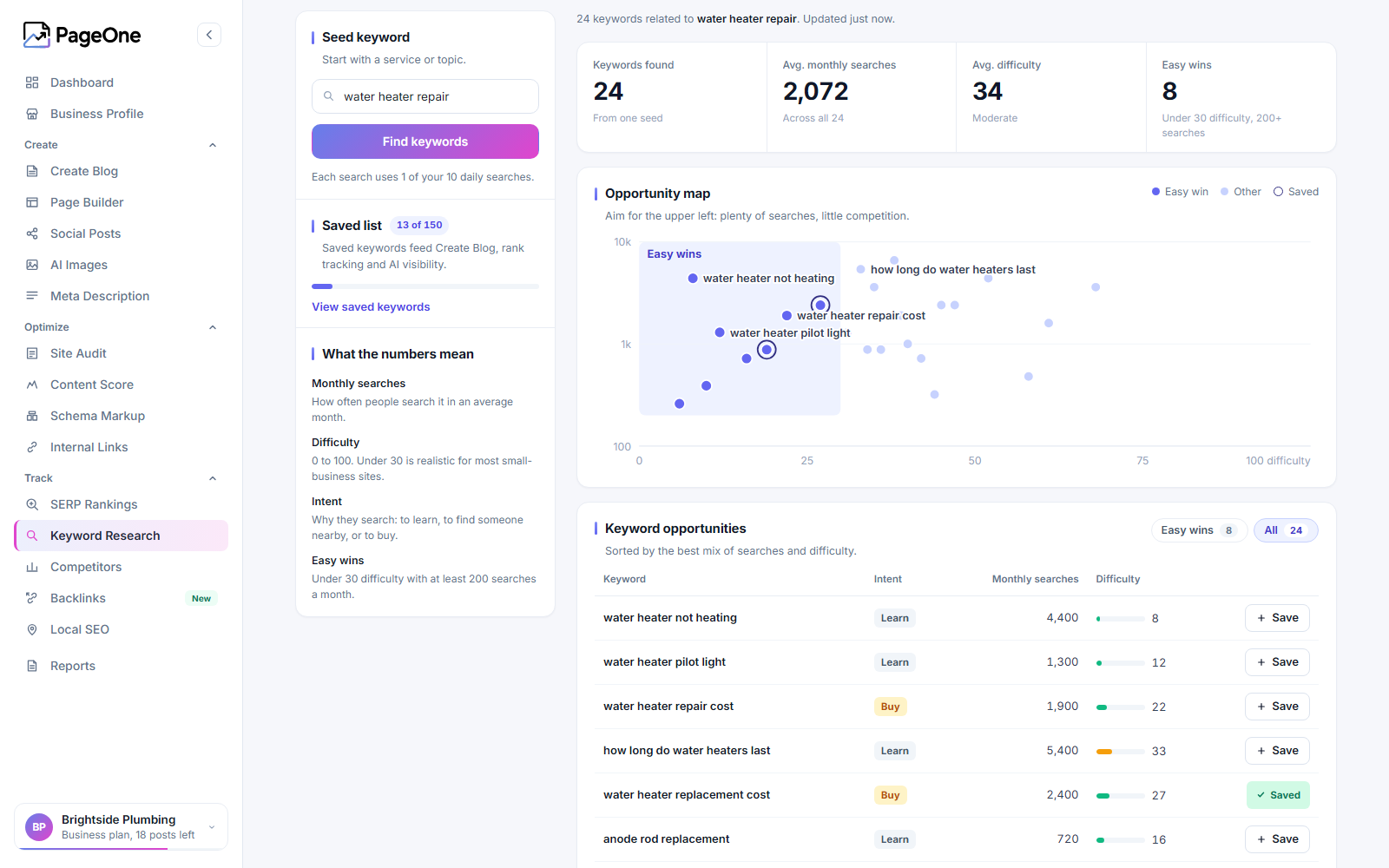
- Keyword research with monthly searches, difficulty and search intent, plus an opportunity map of easy wins
- Social posts written from your content
- AI Page Builder that publishes new pages straight to your site
Free SEO for every page
- SEO titles and meta descriptions, with templates and variables per post type, taxonomy and archive
- Canonical URLs and robots settings (noindex, nofollow and the advanced directives), per page and per type
- Open Graph and X (Twitter) card tags, with a default social image
- Webmaster verification codes (Google, Bing, Yandex, Baidu, Pinterest)
- Structured data as one connected graph: website, organization or person, page, article, breadcrumbs, FAQ and how to
- XML sitemaps built on the WordPress sitemap, with last modified dates and images, and noindexed content left out
- Breadcrumbs as a block, a shortcode and a template function
- SEO fields on categories, tags, custom taxonomies and author profiles
- Crawl clean up switches and a robots.txt editor
Redirects and indexing
- Redirect manager: 301, 302, 307, 410 and 451, plain or regular expression, with hit counts
- Automatic redirects when a post’s or a term’s address changes, and a prompt when content is deleted
- CSV import and export; import from Yoast SEO Premium and the Redirection plugin
- IndexNow: tell participating search engines about new and changed pages (off until you switch it on)
In the post editor
- A PageOne panel in the block editor sidebar and the classic editor
- Google and social previews with editable title, description and address
- Focus keyphrase, related keyphrases and synonyms
- Live SEO and readability checks while you write
- AI actions that use your plan’s credits: title and description suggestions, a content score, schema, internal link suggestions, paragraph rewrites and image alt text
- Blocks: table of contents, related links, sibling pages, subpages, estimated reading time, FAQ and how to
- Cornerstone content, with a report of cornerstone pages that have not been updated for a while
- Orphaned content: pages no other page links to
- A bulk editor for titles, descriptions and keyphrases
See what is working
- Google Search Console and Google Business Profile results in one dashboard, with trends and what needs attention
- A daily briefing that turns your numbers into a short read on what is working, with recommended next steps
- SERP rankings: Google Search Console compared with live Google results
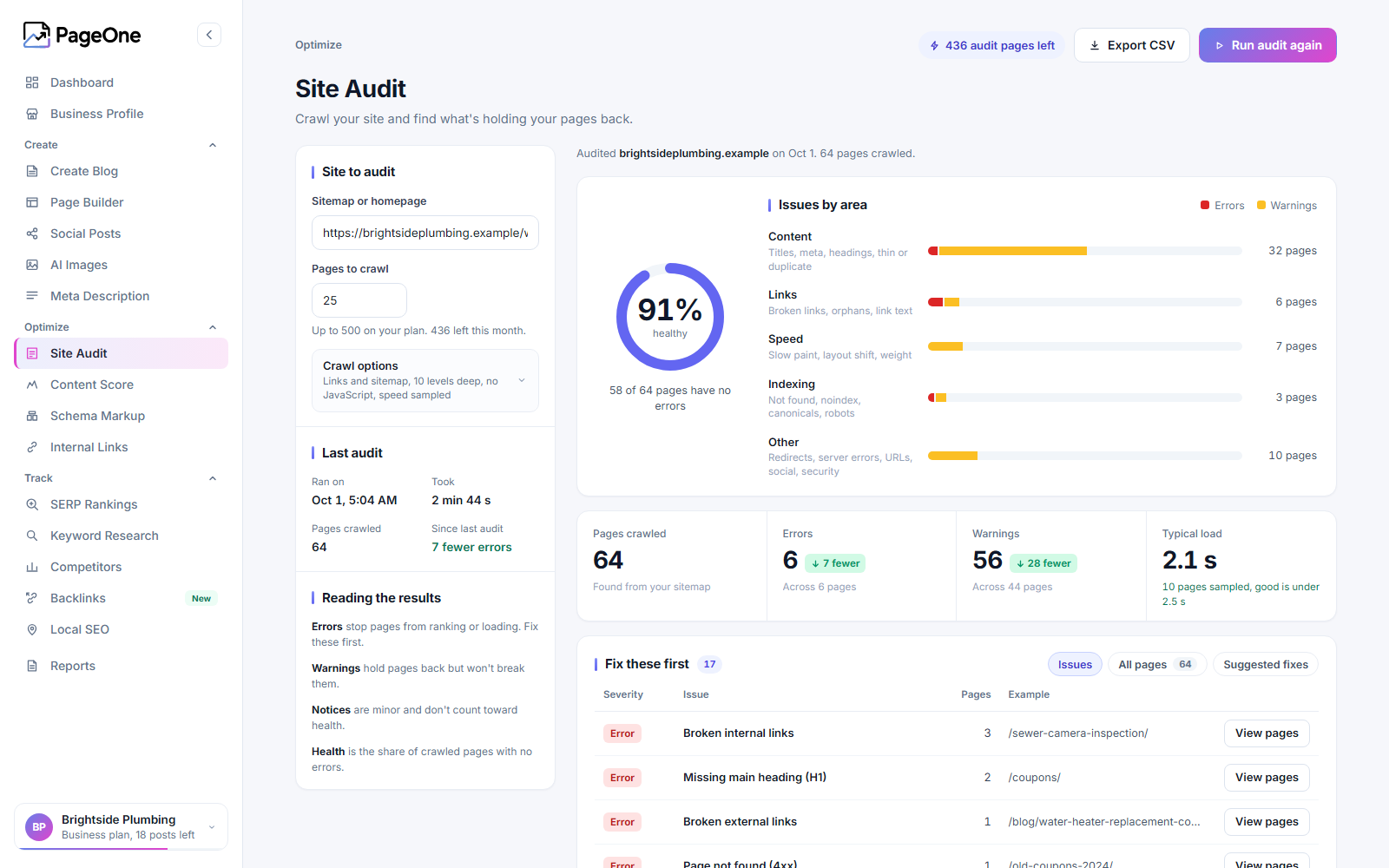
- Site audit with a health score, issues by area and what you fixed since the last run
- Content score, schema markup and internal link suggestions
- Competitor tracking
Built for local businesses
- Business details, opening hours and service areas in your structured data, with address, opening hours and map blocks
- Details filled in by hand or kept in step with your Google Business Profile
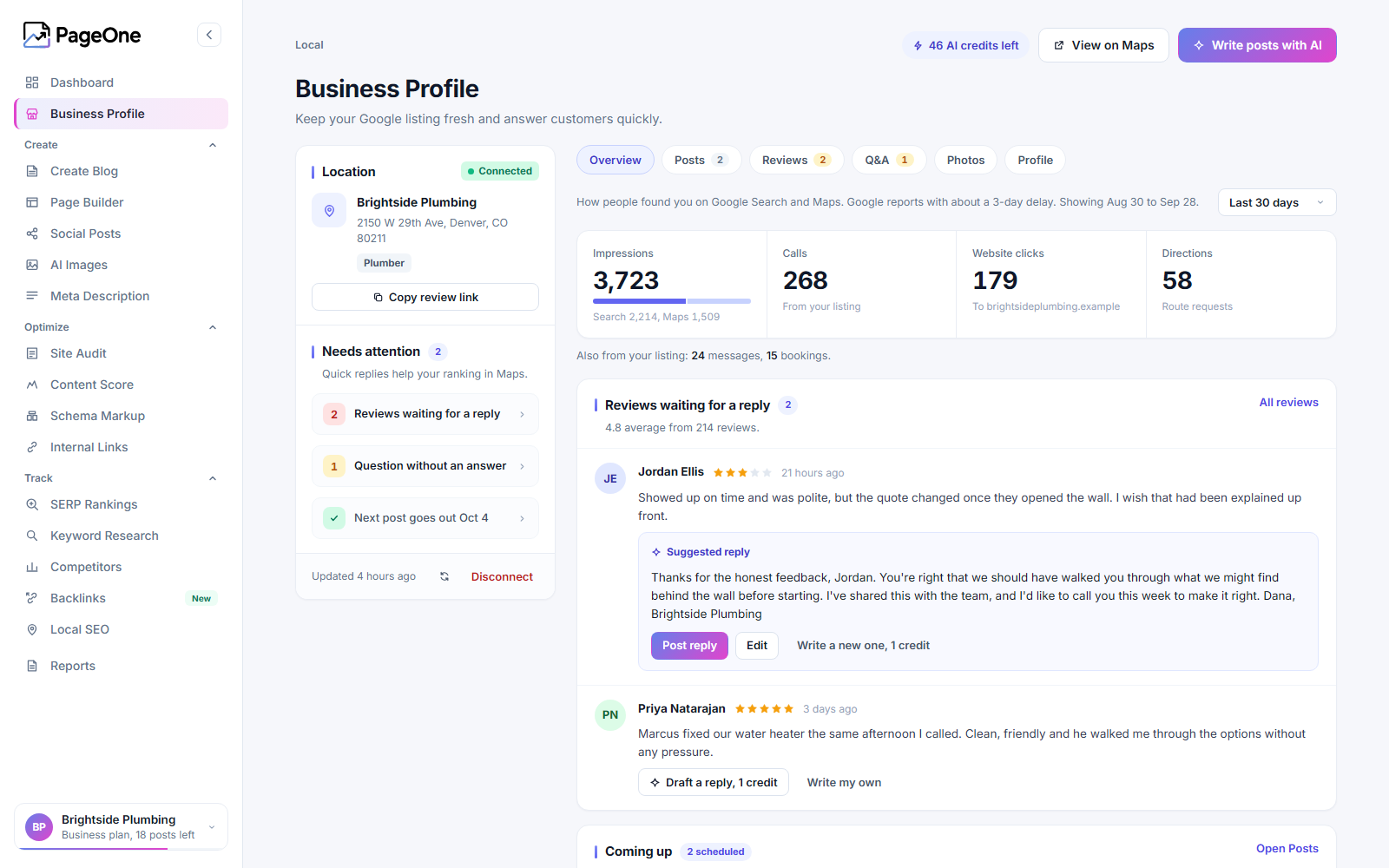
- Business Profile performance, reviews waiting for a reply with a suggested response, and upcoming scheduled posts
WooCommerce
- Product structured data (price, availability, brand, identifiers, reviews)
- Product social tags, sensible defaults for cart, checkout and filtered pages, and product images in the sitemap
For agencies and web designers
- Client reports that show your clients the work and the results
- Site audits, competitor tracking and rank tracking for the sites you manage
Moving from another SEO plugin
- A step by step migration from Yoast SEO and Yoast SEO Premium: scan, backup, import, a page by page comparison of what search engines would see, switch, and a check afterwards
- Titles, descriptions, keyphrases, canonical URLs, robots settings, social values, settings and redirects are carried over; your old plugin’s data is never changed
- One click rollback for 30 days: the old plugin stays installed, and what you change in PageOne is copied back to it
- A basic import (titles, descriptions, keyphrases, canonical URLs, robots and social values) from Rank Math, SEOPress and All in One SEO
- Prefer to keep your SEO plugin? PageOne writes through it and prints no SEO tags of its own
Connected to your site in one click
- PageOne creates a dedicated Application Password, so there are no credentials to copy
- Save any generated blog as a WordPress draft, with the featured image imported to your Media Library
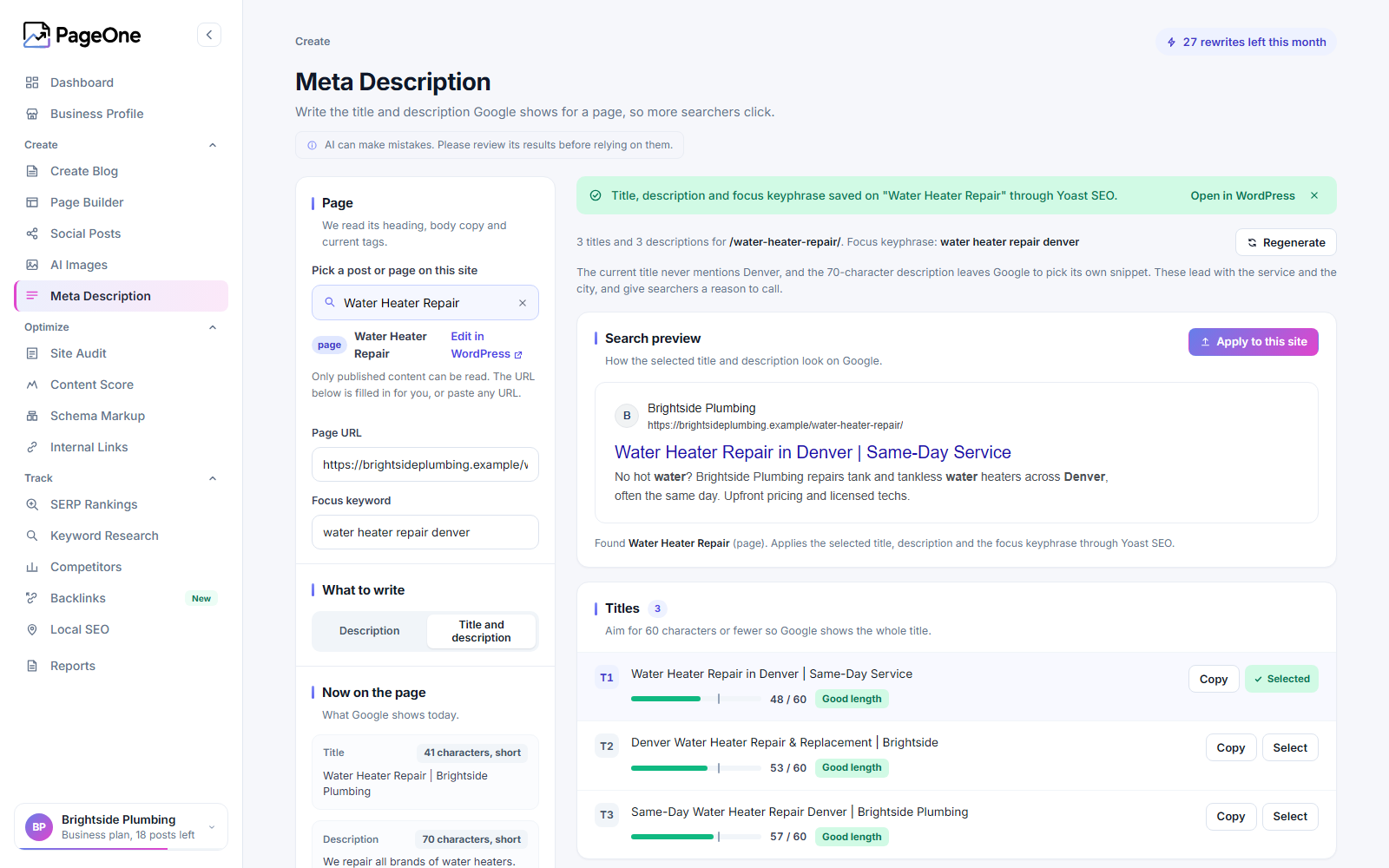
- Apply generated meta descriptions and keyphrases to the matching post on this site
- Every tool from dashboard.unitedsoftwaretech.com is available inside wp-admin, with the same design
What is free and what uses credits
Everything that runs on your own site is free: SEO tags, structured data, sitemaps, breadcrumbs, redirects, the editor panel with its live checks, the content tools and the migration. The AI and data tools, including blog writing, use the monthly credits of your PageOne plan. Free and paid plans are available; your plan determines the monthly quotas and which dashboard tools are included.
Who makes PageOne
PageOne is built by United Software Technologies, a software company in Ohio. Questions reach real people: post in the support forum here or contact us at https://unitedsoftwaretech.com/pageone/
ಸ್ಕ್ರೀನ್ಶಾಟ್ಗಳು
ಸ್ಥಾಪನೆ
- Install PageOne from the WordPress plugin directory, or upload the plugin zip via Plugins Add New Upload Plugin.
- Activate, then open PageOne in the admin menu.
- Sign in with your PageOne account, or create a free one. Existing v3 licenses are migrated automatically.
- Go to PageOne Settings Connect this site so PageOne can publish to this site.
- In the PageOne dashboard, pick your target keywords and set up scheduled blog posts.
- Open PageOne SEO Settings to set up titles, social profiles and sitemaps, or to start the migration from another SEO plugin.
FAQ
-
Do I have to write anything?
-
No. Pick the keywords you want to be found for and how often to post, and PageOne writes the posts. You can edit any post like a normal WordPress post.
-
Can I check posts before they go live?
-
Yes. Have PageOne save each post as a draft instead of publishing it, then read and publish it yourself when you are happy with it.
-
Is PageOne free?
-
The SEO plugin part is free: everything that runs on your own site costs nothing. Blog writing and the other AI and data tools use the credits of your PageOne plan, and the free plan includes a small monthly allowance so you can try them.
-
Do I still need Yoast SEO?
-
No. PageOne can be your site’s SEO plugin: it handles titles, meta descriptions, canonical URLs, robots settings, social tags, structured data, sitemaps, breadcrumbs and redirects. If you would rather keep Yoast SEO (or Rank Math, SEOPress or All in One SEO), PageOne works alongside it: it prints no SEO tags of its own and saves titles, descriptions and keyphrases through that plugin, so a page never gets two sets of tags.
-
How do I move from Yoast SEO to PageOne?
-
Open PageOne SEO Settings and start “Switch to PageOne SEO”. It scans your site, makes a backup of Yoast’s data, imports it, and compares every page: what Yoast prints against what PageOne would print. You only switch once nothing unexplained is left. Afterwards PageOne checks your live pages again. Yoast’s own data is never changed.
-
Can I go back?
-
Yes. For 30 days after the switch your previous SEO plugin stays installed (switched off), and what you change in PageOne is copied back to it. One click switches it back on and returns PageOne to working alongside it.
-
Does it work with Rank Math, SEOPress or All in One SEO?
-
Yes. PageOne works alongside each of them and can import titles, descriptions, keyphrases, canonical URLs, robots settings and social values from them. The full guided migration, with settings and redirects, is for Yoast SEO.
-
What happens to my SEO data if I delete the plugin?
-
PageOne removes its own settings, tables and backups. The titles, descriptions and other SEO values stored on your posts, terms and authors are left in place, so installing PageOne again brings them straight back.
-
The v3 pages (Generate Blog, Meta & Focus Keyphrase, Rank Tracking, Keyword Research, Generate Image) are now sections of the PageOne dashboard. Old bookmarks redirect automatically.
-
Why does PageOne open full screen?
-
The dashboard takes over the page so it looks and behaves exactly like the web version. Open the account menu at the bottom of the PageOne sidebar and choose “Back to WordPress” to return to wp-admin.
ವಿಮರ್ಶೆಗಳು

ಕೊಡುಗೆದಾರರು & ಡೆವಲಪರ್ಗಳು
“PageOne: AI Blog Writer, Auto Posting and SEO” ಓಪನ್ ಸೋರ್ಸ್ ಸಾಫ್ಟ್ವೇರ್ ಆಗಿದೆ. ಕೆಳಗಿನ ಜನರು ಈ ಪ್ಲಗಿನ್ಗೆ ಕೊಡುಗೆ ನೀಡಿದ್ದಾರೆ.
ಕೊಡುಗೆದಾರರು
“PageOne: AI Blog Writer, Auto Posting and SEO” ಅನ್ನು ನಿಮ್ಮ ಭಾಷೆಗೆ ಅನುವಾದಿಸಿ.
ಅಭಿವೃದ್ಧಿಯಲ್ಲಿ ಆಸಕ್ತಿ ಇದೆಯೇ?
ಕೋಡ್ ಬ್ರೌಸ್ ಮಾಡಿ, SVN ರೆಪೊಸಿಟರಿ ಪರಿಶೀಲಿಸಿ, ಅಥವಾ ಅಭಿವೃದ್ಧಿ ಲಾಗ್ ಗೆ RSS ಚಂದಾದಾರರಾಗಿ.
Changelog
4.2.2
- Upgrade from inside PageOne: an “Upgrade your plan” button in the sidebar, an upgrade button in the account menu, and the Plan card at the top of Settings. The new plan goes on the account you are signed in to.
- Paid plans: change your plan or manage billing (card, invoices, cancel) from PageOne.
- Upgrade links where you need them: locked features, out-of-credits messages, the post editor sidebar and the PageOne Settings page in wp-admin.
4.2.1
- Fix: 4.2.0 was packaged as a test build, which labelled it “Beta build” and paused update notices for PageOne. Normal updates are back.
- Fix: “Generate a free license for this domain” on the Settings page showed “Unauthorized”. It now opens the PageOne sign-up page.
4.2.0
- PageOne is now a full SEO plugin: SEO titles and descriptions, canonical and robots settings, social tags, structured data, XML sitemaps and breadcrumbs.
- New post editor panel: search and social previews, live SEO and readability checks, and AI actions that use your credits.
- Switch to PageOne SEO: a guided move from Yoast SEO, Rank Math, SEOPress or All in One SEO that backs up, imports and compares every page before switching, with a 30-day one-click switch back.
- Works alongside your current SEO plugin until you choose to switch.
- Redirect manager, bulk editor for titles and descriptions, orphaned content and cornerstone reports, crawl settings, robots.txt editor and IndexNow.
- Local SEO from your Google Business Profile, and WooCommerce product structured data.
- New blocks: table of contents, related links, sibling pages, sub-pages, reading time, FAQ and How-to.
4.1.0
- New look: every PageOne page redesigned for a cleaner, more consistent layout.
- Business Profile: saved reply drafts and a “Needs attention” list.
- Keyword Research: opportunity map and easy wins. Site Audit: health score, issues by area and changes since the last run.
- AI Images: image history. Meta Description: three options to choose from.
- Long-running tools (scans, comparisons, reports) now finish reliably in the background.
- Fix: generation jobs could wait forever when one finished with an error.
4.0.4
- Site Audit: JavaScript rendering (headless Chromium), crawl options (depth, excludes, discovery mode).
- Site Audit: duplicate body detection, near-duplicate content (paid), and site architecture visualizations.
4.0.3
- Site Audit: expanded technical SEO checks (titles, canonicals, redirects, hreflang, Open Graph, and more).
- Site Audit: pre-fills wp-sitemap.xml when running inside WordPress.
4.0.2
- Updated version to work with version 7.1 of WordPress.
4.0.1
- Fix: sites upgrading from 3.x could error on first load while migrating the existing license.
- Meta Description: pick a post/page on this site, choose which generated description to apply, and open the post in the editor after applying.
- Settings page cleanup.
4.0.0
- Complete rewrite: the full PageOne dashboard now runs inside WordPress with design parity to the web app.
- New tools in the plugin: Page Builder, Social Posts, Site Audit, Content Score, Schema Markup, Internal Links, Local SEO, Competitors, SERP Rankings, Client Reports, AI insights, auto blog generation.
- One-click site connection via Application Passwords.
- Save generated blogs as drafts, import AI images to the Media Library, apply meta to posts (Yoast / Rank Math / SEOPress / fallback).
- Features can be enabled per surface (web dashboard vs WordPress plugin) by PageOne.
- Legacy v3 licenses migrate automatically; old admin page URLs redirect.
3.1.2
- Previous generation plugin (PHP pages): blog, meta & keyphrase, image, keyword research, rank tracking.