

ವಿವರಣೆ
PageFerry exports a single Gutenberg page, post, or custom post type (content + manifest + media) to a ZIP file on staging, then imports it on production with correct block-level attachment remapping, slug + taxonomy preservation (categories, tags, and custom taxonomies), domain rewrite, hash-based media dedup, and update-in-place.
Scope (Gutenberg-only): export/import via ZIP for pages, posts, and block-editor custom post types; featured + inline images; ACF block and post field values with media remapping; slug + categories/tags/custom taxonomies; basic stagingprod domain rewrite; existing-media reuse; create-new or update-selected; land-as-draft option; pre-import backup of overwritten content + plain-language log.
Explicit v1 non-goals: builders (detect + refuse with a clear message), SEO meta, ACF field-group definitions, options/site-wide ACF values, bulk, direct push-without-ZIP, multisite. ACF block values and the exported post’s own ACF field values do ferry — see the FAQ.
Small ZIPs import in one upload. Larger bundles (over your host’s per-upload limit) import file-by-file through an in-browser worker (bundled JavaScript, no extra service): the same dedupe/remap/create result either way. A single asset larger than the limit cannot import — the error names the file.
Imports accept at most 500 required media files, 5,000 media records, a 4 MiB manifest and a 1 GiB compressed ZIP with 2,048 entries. Each media file must fit the site’s upload limit and the 256 MiB ceiling. Browser imports allow 512 MiB of media independently of the single-upload limit; server ZIP imports allow twice a positive upload limit (512 MiB fallback), capped at 1 GiB. Site administrators may lower these bounds. The worker reads selected ZIP entries and waits for each file upload before extracting the next; unusually large bundles can be refused before preview.
Exports apply this site’s import limits too, including the transport selected from the finished ZIP’s size. Oversized bundles refuse with a request to reduce content or media. A destination with lower limits may still refuse the ZIP. Export packaging uses private media copies and needs space for those copies plus the ZIP.
ಸ್ಕ್ರೀನ್ಶಾಟ್ಗಳು


ಸ್ಥಾಪನೆ
- Upload
pageferryto/wp-content/plugins/, activate. - Staging: open a page PageFerry Export Ferry this page download ZIP.
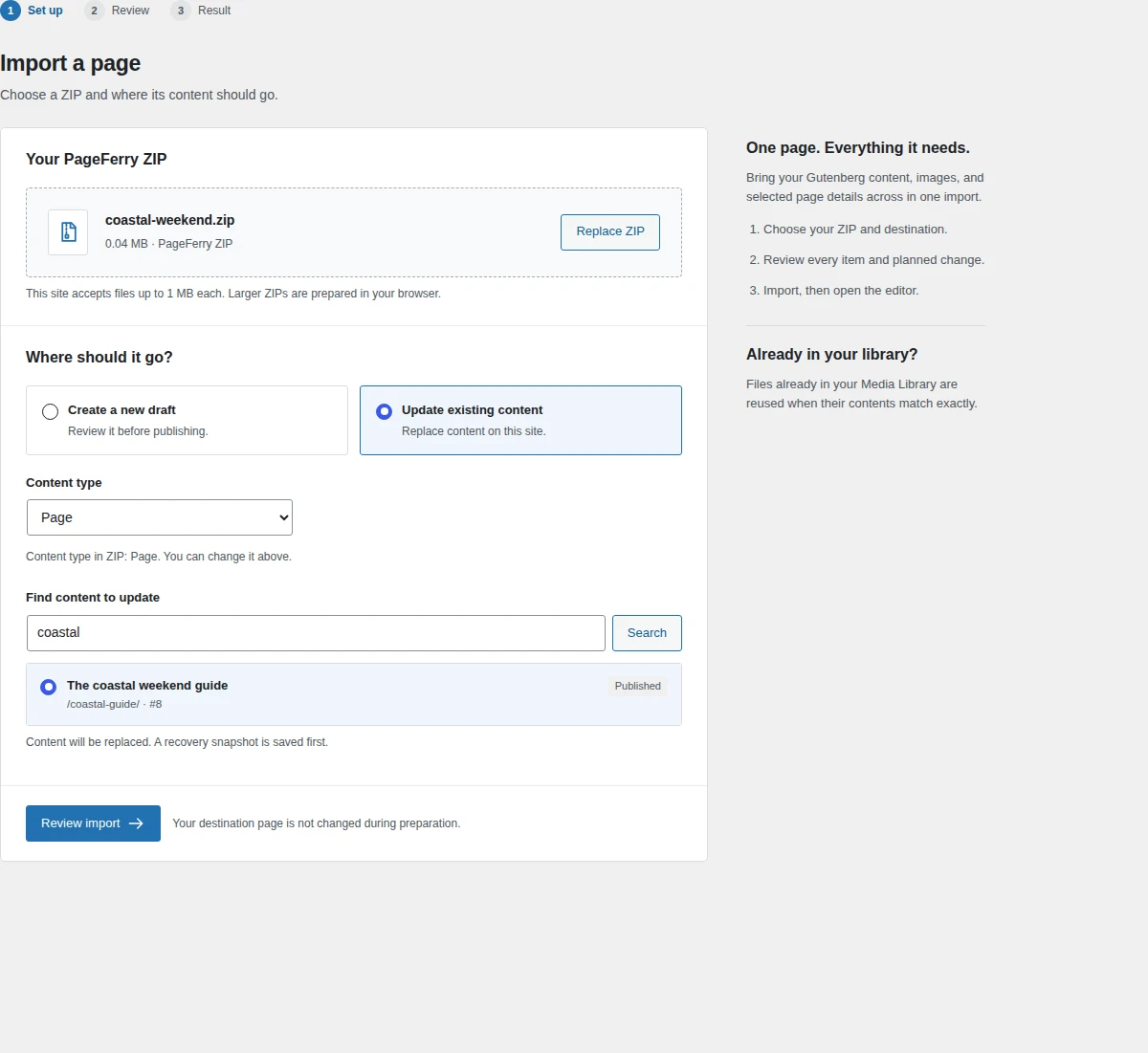
- Production: Tools PageFerry Import select the ZIP choose a new draft or existing destination Prepare review. Post type defaults from the ZIP; a title match never selects an update destination automatically.
- Check the export date, destination and warnings. Edit title, URL slug and excerpt; choose a featured image, template and terms. Edits update the review locally. Confirm the import to save your choices. Content, blocks and supported field values always import.
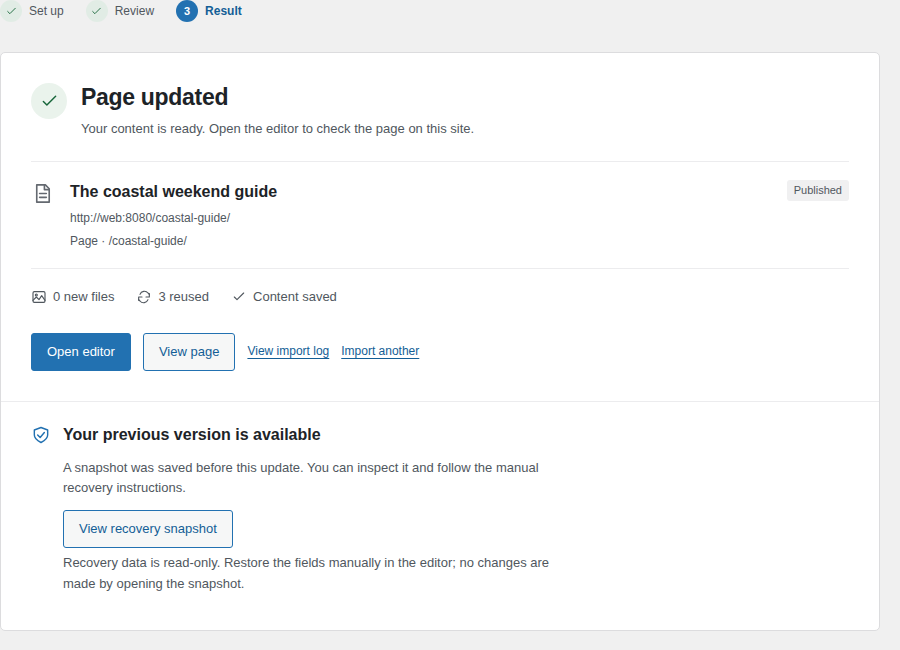
- Completed imports record one row each under Tools PageFerry Import Import log; pre-overwrite snapshots list under Recovery snapshots.
Requires: WordPress 6.5+, PHP 8.1+, PHP zip extension (for export and single-upload import; sites without it import file-by-file through the browser worker).
FAQ
-
Where are temporary files stored?
-
Exports and both import paths stage files in a site-specific, owner-only directory outside WordPress and uploads. The default parent is PHP’s system temporary directory; PageFerry checks its location and permissions before using it. If private storage is unavailable, export and import stop. Your host can set PAGEFERRY_PRIVATE_DIR in wp-config.php to an existing private parent shared by all PHP workers. The host must keep this parent outside every public document root and web-server alias, secure PHP’s own upload temporary directory, and provide coherent filesystem locks and rename operations. Containers must share the same private storage mount when handling the same import sessions.
The single-upload ZIP is deleted after preparation, with shutdown cleanup where available. Abandoned files and hard-killed requests are reclaimed by later admin-triggered GC after the idle grace; active leases and live sessions remain protected. Existing confirmations prepared in the old uploads location must be prepared again. Legacy cleanup requires the original workspace guards and activity/lock records; ordinary uploaded ZIPs and ambiguous old folders are preserved.
-
Why was my Elementor page refused?
-
PageFerry v1 imports Gutenberg pages only. The exporter detects page-builder meta (Elementor, Divi, Beaver Builder, Bricks, WPBakery) and records it in the bundle; the importer refuses the bundle with a message naming the builder instead of silently corrupting the layout. Export your content as Gutenberg blocks (or rebuild the page in the block editor) and ferry again. Builder support is planned after v1.
-
How does media dedup work?
-
Every media file is hashed (SHA-256) at export. On import, PageFerry looks the hash up in its reuse index and verifies the match by re-hashing the existing attachment — a stale index row never reuses a deleted file. Identical bytes reuse the existing attachment; same filename with different bytes uploads separately. The confirmation screen reports reused-vs-new counts plus missing source IDs, export notes, and ACF skips before anything is written, and the Logs tab records them per import (a success with skipped values shows as success with warnings).
-
Update vs create — which is used?
-
Choose the destination post type first; it applies to both new drafts and updates. Create-new inserts a draft of that type. Update-selected replaces the selected post’s content and checked details after saving a recovery snapshot; its status stays the same and its current URL slug is the default. An explicit slug edit changes the URL after review. The selected post must already have the chosen type. You can import a bundle into a different supported type, with a warning to check its taxonomies and template.
Terms match by slug, then name and parent; legacy name-only terms match by name. Existing terms keep their current parents. Selected new terms bring along the parents needed to recreate their hierarchy. There is no one-click rollback in v1 — restore from the Backups tab by pasting the stored content back.
-
Can I choose which parts to import?
-
Yes. The review shows every media item, term and reference location inline, plus editable title, excerpt and URL slug, a visual featured-image picker and template choices. Reset restores an edited field to its ZIP value. For each taxonomy, unchecked Clear keeps existing assignments and adds selected ZIP terms; checked Clear replaces them with selected terms, or clears everything when none are selected. All and individual term selections do not change Clear. A featured image must remain included in media. Content, blocks and supported field values always import together.
Media marked “Check this item” was detected from a number in a block setting that might be unrelated to an image. Inspect its thumbnail and reference locations before choosing. Excluded media is not imported or remapped, so its references may need repair. Thumbnails are private previews of staged files; unsupported or oversized images use a fallback. Choices apply after the ZIP has been uploaded and prepared.
-
What if the result is partial or the connection is lost?
-
A partial result identifies the saved page, incomplete items and available recovery data. If the execution response is lost, PageFerry cannot confirm whether the server saved the page: check the destination and import log before trying again. It does not automatically repeat execution or provide one-click rollback.
-
Where is my pre-import backup?
-
Tools PageFerry Import Backups. Each update-selected import stores the target’s prior title, content, excerpt, URL slug, terms, featured image and meta under a
pf-*key before overwriting the post. Successful updates retain the last 20; partial outcomes keep recovery data. Results link to an authorized read-only snapshot when available. Restore manually in the editor; opening the snapshot makes no changes. Logs are supplementary and best effort. -
The import says a file is too large. What now?
-
Your host caps each upload (
upload_max_filesize), and PageFerry caps each media file at 256 MiB. Bundles over the host cap import file-by-file automatically — but one asset over the effective file limit cannot. Raise a smaller PHP upload limit, or reduce that asset and re-export. The error names the file. Aggregate and archive limits also apply as described above. -
Does PageFerry ferry ACF data?
-
ACF blocks: blocks that keep their field data in the block comment (the ACF default) ferry like any other blocks: media IDs remap, everything else passes through. Blocks that store their fields in post meta (
usePostMeta, ACF PRO 6.3+) ferry their field values too: image/file/gallery IDs remap to the new attachments, upload URLs rewrite, all other values restore verbatim through the ACF API.Post fields: non-block field groups located on the exported post itself (Post Type, Post, template, status or taxonomy rules) ferry the post’s own values in the bundle (
acf_post_fields). On import, every name is checked against the fields the destination actually exposes for that post type (create) or the selected post (update); matching values restore through the ACF API with media-ID remap and URL rewrite, and names with no destination definition are skipped and listed in the preview and log instead of being written. Field-group definitions are not shipped — register matching field groups on production first.Three limits apply to both: reference fields (post/relationship/taxonomy/user/page-link IDs) point at source-site content and ferry verbatim — the export warns when they hold values; nested group/repeater/flexible-content values require synchronized field definitions — incompatible child keys, rows or layouts skip the whole field before any of its values change, with notes in preview and completion; and on update-selected imports, fields unset on the source keep the target’s existing values.
Exports check saved values rather than field defaults, including nested children. Explicitly saved empty and zero values still transfer. Re-export older bundles with 1.2.2 or later to apply this distinction.
For post fields and usePostMeta block fields, PageFerry skips fields with Save Terms or bidirectional updates, including any container with such a descendant. The preview and log explain each skip; its destination values and related objects stay unchanged. Reused or unmapped media is never reparented by these ACF writes. Only attachments created by the current import can connect to its destination post.
-
Does PageFerry phone home or load remote code?
-
No. v1 makes no outbound requests, loads no CDN scripts, and runs with no account or license key. All JavaScript (including the large-bundle worker dependency fflate 0.8.3, MIT, source at https://github.com/101arrowz/fflate) ships inside the plugin. Import/export handlers require the
import/edit_postcapabilities plus nonces.
ವಿಮರ್ಶೆಗಳು
ಈ ಪ್ಲಗಿನ್ಗೆ ಯಾವುದೇ ವಿಮರ್ಶೆಗಳಿಲ್ಲ.
ಕೊಡುಗೆದಾರರು & ಡೆವಲಪರ್ಗಳು
“PageFerry” ಓಪನ್ ಸೋರ್ಸ್ ಸಾಫ್ಟ್ವೇರ್ ಆಗಿದೆ. ಕೆಳಗಿನ ಜನರು ಈ ಪ್ಲಗಿನ್ಗೆ ಕೊಡುಗೆ ನೀಡಿದ್ದಾರೆ.
ಕೊಡುಗೆದಾರರು
“PageFerry” ಅನ್ನು ನಿಮ್ಮ ಭಾಷೆಗೆ ಅನುವಾದಿಸಿ.
ಅಭಿವೃದ್ಧಿಯಲ್ಲಿ ಆಸಕ್ತಿ ಇದೆಯೇ?
ಕೋಡ್ ಬ್ರೌಸ್ ಮಾಡಿ, SVN ರೆಪೊಸಿಟರಿ ಪರಿಶೀಲಿಸಿ, ಅಥವಾ ಅಭಿವೃದ್ಧಿ ಲಾಗ್ ಗೆ RSS ಚಂದಾದಾರರಾಗಿ.
Changelog
1.3.5
- List each import template once, using its display name and preserving the ZIP, default and current-template choices.
- Avoid false missing-template notes when different templates share a display name.
- Clarify import review details, show the export date and keep draft identity in sync with title edits.
- Reduce repeated media validation, review preparation and recovery-history loading while preserving final import checks.
- Use private staging, bounded export resources and checked ZIP download handles.
- Add repeatable Docker checks for supported WordPress and PHP versions.
1.3.4
- Recalculate import choices locally without server requests after edits, bulk actions or resets.
- Apply the current choices on final confirmation, preserving destination, ownership and integrity checks.
- Remove refresh waits and keep valid choices ready to import while editing.
1.3.3
- Update review summaries immediately for detail, media, taxonomy, featured-image and template choices, including bulk actions and resets.
- Avoid repeating media verification and full previews while editing; retain integrity and permission checks before saving.
- Keep controls and typed values in place during automatic checks, with safe handling of slow responses and retryable failures.
1.3.2
- Switch import, log and recovery tabs without reloading the page, preserving the current import.
- Check edits automatically before separate confirmation; preserve newer choices during slow checks.
- Hide empty taxonomy rows and unnecessary Clear controls; clarify warnings and recovery details.
1.3.1
- Restore the approved import prototype’s layout, ZIP and destination cards, featured-image grid, media badges, inline taxonomy choices, and result/recovery panels.
1.3.0
- Redesign import around Set up, Review and Result with every detail and reference visible inline.
- Default post type and update search from ZIP metadata; edit title, URL slug and excerpt with Reset, choose a featured image and template, then refresh and confirm separately.
- Keep taxonomy clearing independent of selected ZIP terms: add to current assignments or replace them explicitly.
- Show saved, partial and unconfirmed outcomes with incomplete items and authorized read-only recovery data.
1.2.5
- Preserve concurrent import log and media hash entries, including abort cleanup, through coordinated fresh option writes.
- Batch each import’s pending media hashes into one index update.
1.2.4
- Skip incompatible nested ACF values before writing the field, preserving existing children and row counts with matching preview and completion notes.
1.2.3
- Preserve backslashes in imported ACF post fields and usePostMeta block values, including paths, regexes, JSON and nested fields. Correctly saved values no longer report an ACF partial failure.
1.2.2
- Omit unsaved ACF post fields and usePostMeta values from exports, including defaulted nested children, while retaining explicitly saved empty and zero values. Update imports preserve the destination values for omitted fields.
1.2.1
- Constrain ACF post-field and usePostMeta restoration: preserve fields and containers that enable Save Terms or bidirectional updates, with matching preview and log notes.
- Preserve reused and unmapped attachment parents during ACF restoration; attachment connections are limited to media created by the current import and its destination post.
1.2.0
- ACF post fields: non-block field groups located on the exported post (Post Type, Post, template, status or taxonomy rules) now ferry the post’s own values in the bundle (
acf_post_fields) and restore on import through the ACF API, with media-ID remap and URL rewrite. The import checks every name against the destination post type (create) or selected post (update), skips names the destination does not define, and reports them in the preview and log (acf_skipped). Field-group definitions and options/site-wide values are still not shipped. - ACF blocks and post fields share the same typed remap and persistence verification, so skipped or partially saved values stay visible in the log.
1.1.0
- Custom post types (block-editor) and custom taxonomies: the export metabox appears on every Gutenberg-edited post type, bundles carry all attached taxonomies, and the importer recreates the post type + term hierarchy on production (the post type must be registered there first).
- ACF
usePostMetablocks: field values stored in post meta now ferry in the bundle (acf_post_meta) and restore on import with media-ID remap and URL rewrite, written back through the ACF API. Skipped values are reported in the import log row (acf_skipped); reference-type IDs ferry verbatim (export warns).
1.0.0
- First release: ferry a Gutenberg page or post with its media as a single ZIP bundle — export with manifest, import with block-level attachment remap, URL + domain rewrite, SHA-256 media dedup, slug + category/tag preservation, create-new or update-selected, land-as-draft, pre-import backup plus plain-language log. Builder-marked bundles refuse with a clear message.