

ವಿವರಣೆ
MDL Local Geo Lookup automatically downloads an IP geolocation database to your own server. All lookups happen locally — no external API calls on every page load.
No sign-up required for the default DB-IP source.
By default the plugin uses the free DB-IP City Lite database (CC BY 4.0), which requires no account or license key. Users who prefer MaxMind GeoLite2 can switch to it in Settings by entering a free license key.
Features:
- DB-IP default source with one-click first-run setup after activation (no account needed)
- Optional MaxMind GeoLite2 support (free license key required)
- GeoIP2 PHP reader library bundled with the plugin — no external download required
- Scheduled auto-updates keep the database current (configurable: 1–30 days)
[mdlgeo_visitor_info]shortcode to display visitor location on any page or postmdlgeo_get_visitor_geo_data()PHP function for use in themes and custom plugins- Visitor location log with paginated view in the admin panel
- Tracks the installed MMDB source and warns if it does not match the selected source
- Requires a manual MMDB refresh when the installed database source is unknown or out of alignment
- Cloudflare-compatible — prefers
CF-Connecting-IPwhen Cloudflare headers are present - Log files protected from public web access
Requirements:
- PHP 7.4+
- PHP extensions:
zlib,phar - WordPress 5.8+
- MaxMind license key only required if you choose the MaxMind source option
Privacy:
Visitor location logging is disabled by default and must be explicitly enabled by the site admin in Settings. When enabled, visitor IP addresses and approximate locations are logged to a local file on your server. No data is sent to third-party services. Because these log entries are stored only against IP addresses and not durable user identifiers such as email addresses, the plugin does not integrate this log with WordPress personal data export or erasure tools. You are responsible for disclosing this in your site’s privacy policy.
External Services
This plugin connects to the following third-party services to download geolocation databases and libraries. No visitor data is transmitted to these services.
DB-IP (default)
- What: Downloads the free DB-IP City Lite database (
.mmdbformat). - When: On first-run setup (triggered by the admin) and on the configured auto-update schedule.
- URL:
https://download.db-ip.com/free/dbip-city-lite-{year}-{month}.mmdb.gz - Website: https://db-ip.com
- Terms of Use: https://db-ip.com/db/lite.php — licensed under CC BY 4.0
- Privacy Policy: https://db-ip.com/privacy.php
MaxMind GeoLite2 (optional)
- What: Downloads the MaxMind GeoLite2 City database (
.mmdbformat). Only used if the admin selects MaxMind as the database source and provides a license key. - When: On source change or license key update, and on the configured auto-update schedule.
- URL:
https://download.maxmind.com/app/geoip_download?... - Website: https://www.maxmind.com
- Terms of Use: https://www.maxmind.com/en/geolite2/eula
- Privacy Policy: https://www.maxmind.com/en/privacy-policy
Privacy Policy
When visitor logging is enabled, this plugin logs visitor IP addresses and approximate geographic locations to a local file on your server. Logging is disabled by default and must be explicitly enabled by the site admin. No data is transmitted to external services by the plugin itself. Because the log is stored only against IP addresses and approximate location data, it is not connected to WordPress personal data export or erasure tools. You must disclose this data collection in your site’s privacy policy in accordance with applicable law (GDPR, CCPA, etc.).
This plugin uses the GeoLite2 database created by MaxMind, available from https://www.maxmind.com.
ಸ್ಕ್ರೀನ್ಶಾಟ್ಗಳು
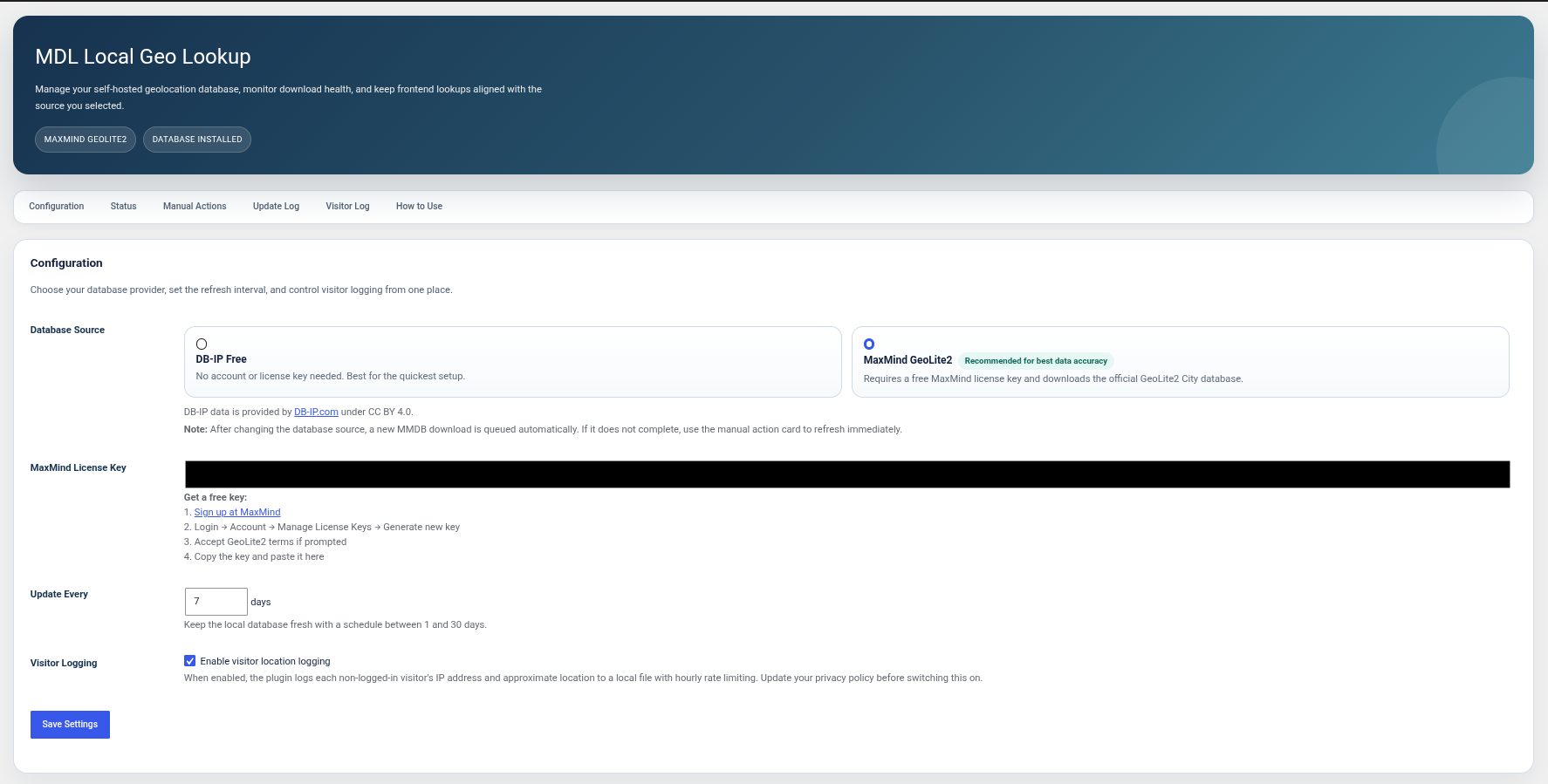
Settings page — database source, license key, update interval, source alignment status, and logs 
Visitor log — paginated view of logged visitors 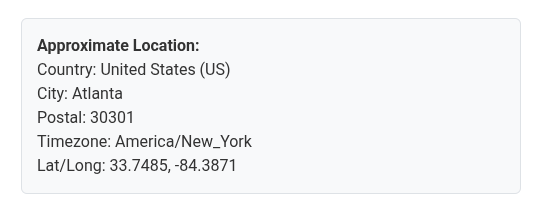
Shortcode output — [mdlgeo_visitor_info] displaying location info
ಸ್ಥಾಪನೆ
- Upload the
mdl-local-geo-lookupfolder to/wp-content/plugins/ - Activate the plugin via Plugins > Installed Plugins
- Click Download Now in the admin notice to fetch the DB-IP database
- Optionally go to Settings > MDL Local Geo Lookup Settings to switch to MaxMind GeoLite2 (free license key required) or adjust the update interval
FAQ
-
Where do I get a MaxMind license key?
-
- Create a free MaxMind account
- Log in and go to Account Manage License Keys
- Generate a new license key
- Accept the GeoLite2 End User License Agreement if prompted
- Paste the key into Settings > MDL Local Geo Lookup Settings
-
Where is the database stored?
-
The GeoLite2-City.mmdb file is stored in your WordPress uploads folder:
wp-content/uploads/mdl-local-geo-lookup/GeoLite2-City.mmdbThe GeoIP2 PHP reader library is bundled inside the plugin folder and does not need to be downloaded.
-
How often is the database updated?
-
By default, every 7 days. You can set this to any value between 1 and 30 days in the plugin settings. MaxMind releases updated GeoLite2 databases on the first Tuesday of each month.
-
What happens if the selected source and installed MMDB file do not match?
-
The plugin tracks which source last downloaded the installed MMDB file. If the selected source and installed file source do not match, the settings page shows a warning and asks you to run a manual database update. If the installed MMDB source is unknown, the plugin also prompts you to download or update the database before relying on source alignment.
-
Can I use this without a MaxMind account?
-
Yes. The plugin uses the free DB-IP database by default — no account or license key needed. MaxMind GeoLite2 is available as an optional alternative in Settings.
-
Does this work behind Cloudflare?
-
Yes. When Cloudflare is in front of your site, the plugin reads the real visitor IP from the
CF-Connecting-IPheader automatically. -
What data is logged?
-
Visitor logging is disabled by default. When enabled in Settings, each frontend page load by a non-logged-in visitor appends one line to
visitors.logcontaining: serial number, timestamp, IP address, country, city, postal code, timezone, and coordinates. -
Does the visitor log support WordPress privacy exports or erasure requests?
-
No. The visitor log stores IP addresses and approximate location data only, and those entries are not linked to durable identifiers such as email addresses. Because of that, the plugin does not register the visitor log with WordPress personal data export or erasure tools.
-
Is the visitor log publicly accessible?
-
No. An
.htaccessfile and anindex.phpfile are created in the logs directory on activation to block direct web access. -
Can I use this with form builders?
-
Yes. You can place the
[mdlgeo_visitor_info]shortcode inside a hidden field in Elementor Forms, Contact Form 7, WPForms, Gravity Forms, or any HTML form. The visitor’s location data will be submitted along with the form. See the “How to Use” section in the settings page for examples. -
Does this work on WordPress Multisite?
-
The plugin is designed for single-site use. It can be activated per-site on a multisite network, but network-wide (network activation) is not officially supported. Each site manages its own database and settings independently.
ವಿಮರ್ಶೆಗಳು
ಈ ಪ್ಲಗಿನ್ಗೆ ಯಾವುದೇ ವಿಮರ್ಶೆಗಳಿಲ್ಲ.
ಕೊಡುಗೆದಾರರು & ಡೆವಲಪರ್ಗಳು
“MDL Local Geo Lookup” ಓಪನ್ ಸೋರ್ಸ್ ಸಾಫ್ಟ್ವೇರ್ ಆಗಿದೆ. ಕೆಳಗಿನ ಜನರು ಈ ಪ್ಲಗಿನ್ಗೆ ಕೊಡುಗೆ ನೀಡಿದ್ದಾರೆ.
ಕೊಡುಗೆದಾರರು
“MDL Local Geo Lookup” ಅನ್ನು ನಿಮ್ಮ ಭಾಷೆಗೆ ಅನುವಾದಿಸಿ.
ಅಭಿವೃದ್ಧಿಯಲ್ಲಿ ಆಸಕ್ತಿ ಇದೆಯೇ?
ಕೋಡ್ ಬ್ರೌಸ್ ಮಾಡಿ, SVN ರೆಪೊಸಿಟರಿ ಪರಿಶೀಲಿಸಿ, ಅಥವಾ ಅಭಿವೃದ್ಧಿ ಲಾಗ್ ಗೆ RSS ಚಂದಾದಾರರಾಗಿ.
Changelog
1.0.0
- Initial release.