

ವಿವರಣೆ
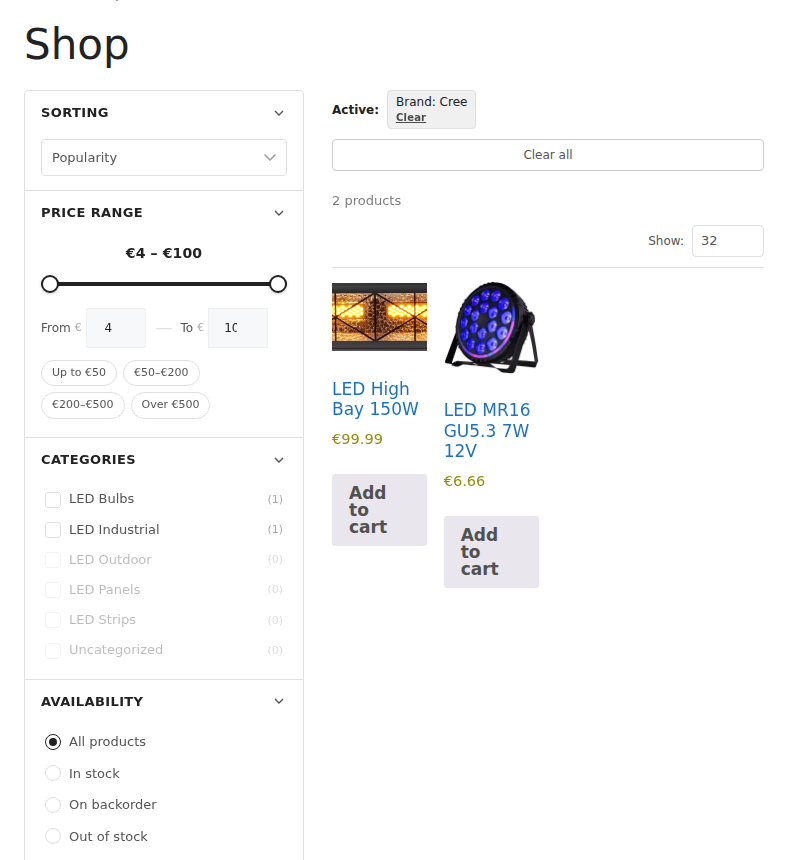
Rotozoom Product Filter adds a fast, modern filtering sidebar to your WooCommerce shop, category and search pages. Customers narrow down products instantly — without full page reloads — using attributes, price ranges, stock status, ratings, on-sale and more.
The plugin renders results through your active theme’s own product loop, so filtered results look identical to your normal shop pages on classic themes, third-party themes and block (FSE) themes alike.
Features
- AJAX filtering with no page reload
- Filter by product attributes (color, size, socket, wattage — any WooCommerce attribute)
- Price range slider
- Stock status, on-sale, new, rating and review filters
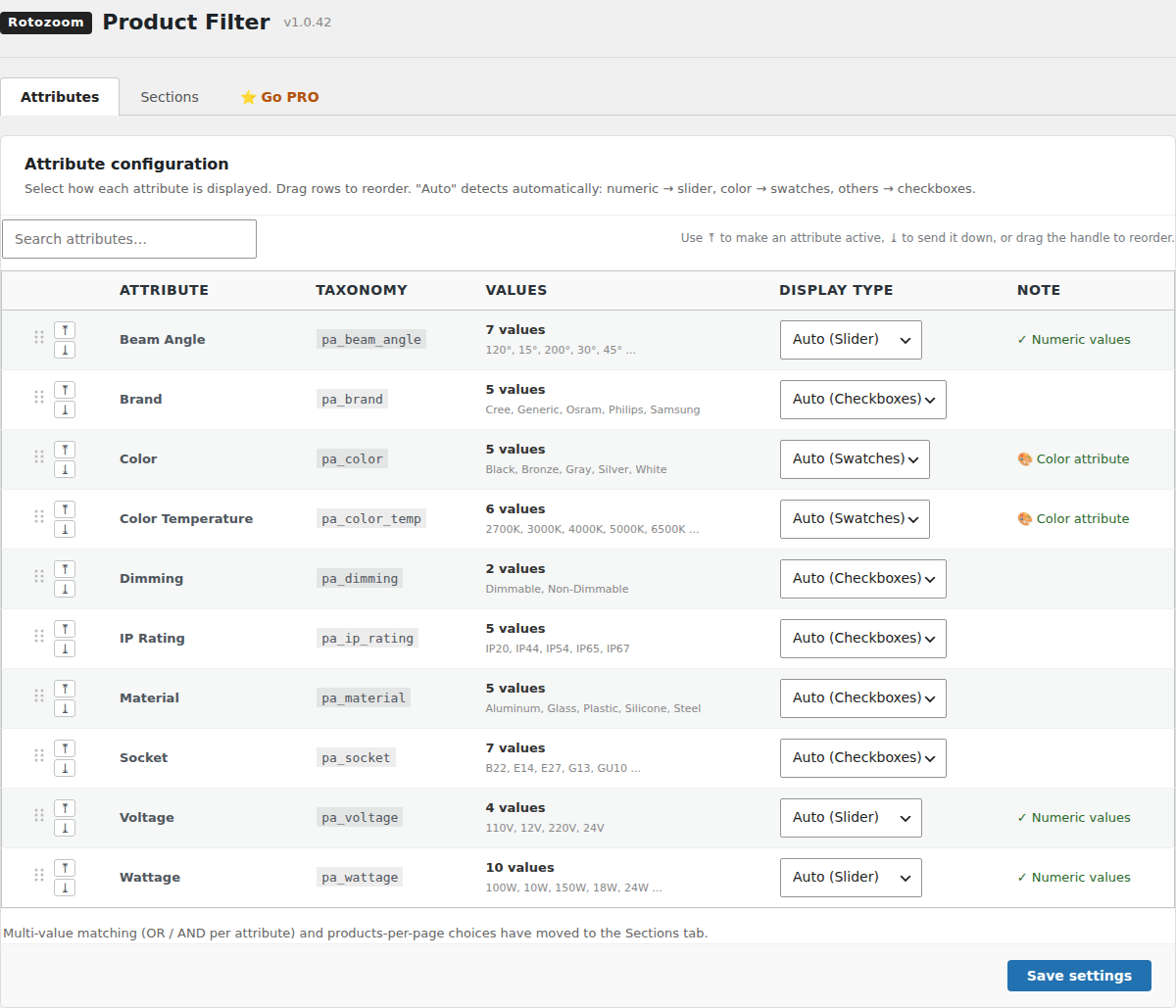
- Per-attribute display types: checkboxes, radio, color swatches, or numeric slider
- Drag & drop to order attributes in the admin
- Sortable sections and collapsible groups
- Mobile filter drawer
- Works with classic, third-party and block (FSE) themes
- Translation-ready
Shortcodes
[rotozoom_filter]— renders the filter sidebar and a filterable product grid on any page or post-
[rotozoom_filter_bar]— renders the per-page selector on its own, for authors who want it somewhere other than above the grid (use together with[rotozoom_filter bar="0"])[rotozoom_filter] accepts:
-
category— limit the grid to one product category slug, e.g.[rotozoom_filter category="led-panels"] per_page— products per page (default: your shop’s WooCommerce products per page)columns— grid columns (default: your theme’s WooCommerce setting)orderby—menu_order,popularity,rating,date,priceorprice-descsidebar—0to render the grid without the filter sidebarbar—0to hide the built-in toolbar
External services
This plugin does not connect to, send data to, or load any code from external services. It runs entirely on your own site.
ಸ್ಕ್ರೀನ್ಶಾಟ್ಗಳು
ಸ್ಥಾಪನೆ
- Upload the
rotozoom-product-filterfolder to/wp-content/plugins/, or install it through the WordPress Plugins screen. - Activate the plugin through the Plugins screen in WordPress.
- Make sure WooCommerce is installed and active.
- Open Product Filter in the admin menu to choose which attributes and sections to show.
- The filter appears automatically on shop, category and search pages, or place the
[rotozoom_filter]shortcode on any page.
FAQ
-
Does it require WooCommerce?
-
Yes. Rotozoom Product Filter extends WooCommerce, and WordPress asks you to install and activate WooCommerce first.
-
Does it work with block / Full Site Editing themes?
-
Yes. Results are rendered through your theme’s native product loop, so block themes (for example Twenty Twenty-Four) display filtered products with their normal styling.
-
Does it send any data to external servers?
-
No. The plugin is fully self-contained and makes no external network requests.
ವಿಮರ್ಶೆಗಳು
ಈ ಪ್ಲಗಿನ್ಗೆ ಯಾವುದೇ ವಿಮರ್ಶೆಗಳಿಲ್ಲ.
ಕೊಡುಗೆದಾರರು & ಡೆವಲಪರ್ಗಳು
“Rotozoom Product Filter” ಓಪನ್ ಸೋರ್ಸ್ ಸಾಫ್ಟ್ವೇರ್ ಆಗಿದೆ. ಕೆಳಗಿನ ಜನರು ಈ ಪ್ಲಗಿನ್ಗೆ ಕೊಡುಗೆ ನೀಡಿದ್ದಾರೆ.
ಕೊಡುಗೆದಾರರು
“Rotozoom Product Filter” ಅನ್ನು ನಿಮ್ಮ ಭಾಷೆಗೆ ಅನುವಾದಿಸಿ.
ಅಭಿವೃದ್ಧಿಯಲ್ಲಿ ಆಸಕ್ತಿ ಇದೆಯೇ?
ಕೋಡ್ ಬ್ರೌಸ್ ಮಾಡಿ, SVN ರೆಪೊಸಿಟರಿ ಪರಿಶೀಲಿಸಿ, ಅಥವಾ ಅಭಿವೃದ್ಧಿ ಲಾಗ್ ಗೆ RSS ಚಂದಾದಾರರಾಗಿ.
Changelog
1.1.0
- Tested with WordPress 7.1 and WooCommerce 11.2.
- Code tidy-up; no change to how the filter works.
1.0.43
- First release on WordPress.org.
- Several values of one attribute can be ticked together (any of them matches), and every value shows how many products it would add.
- The price presets follow the shop’s own prices.
- Filtering and pagination work on shop addresses that live in the query string (
?post_type=product, a product search, plain permalinks). - A filter request that drops at the network level is retried once; counts that cannot be refreshed are dimmed and every option stays clickable.
- The AJAX request timeout can be changed with the
rotozoom_filter_ajax_timeoutfilter (20 seconds by default, 1 to 600 seconds).