

ವಿವರಣೆ
SB Replayborg records what visitors do on your site and lets you play it back — the pages they moved through, where they clicked, how long they stayed. Everything is captured by your own site and stored in your own database. No third-party service is involved at any point, and nothing is sent anywhere.
Listed here as SB Replayborg — SB for Stackborg, who publish it. In your admin menu and on its screens it is simply Replayborg.
What this version does
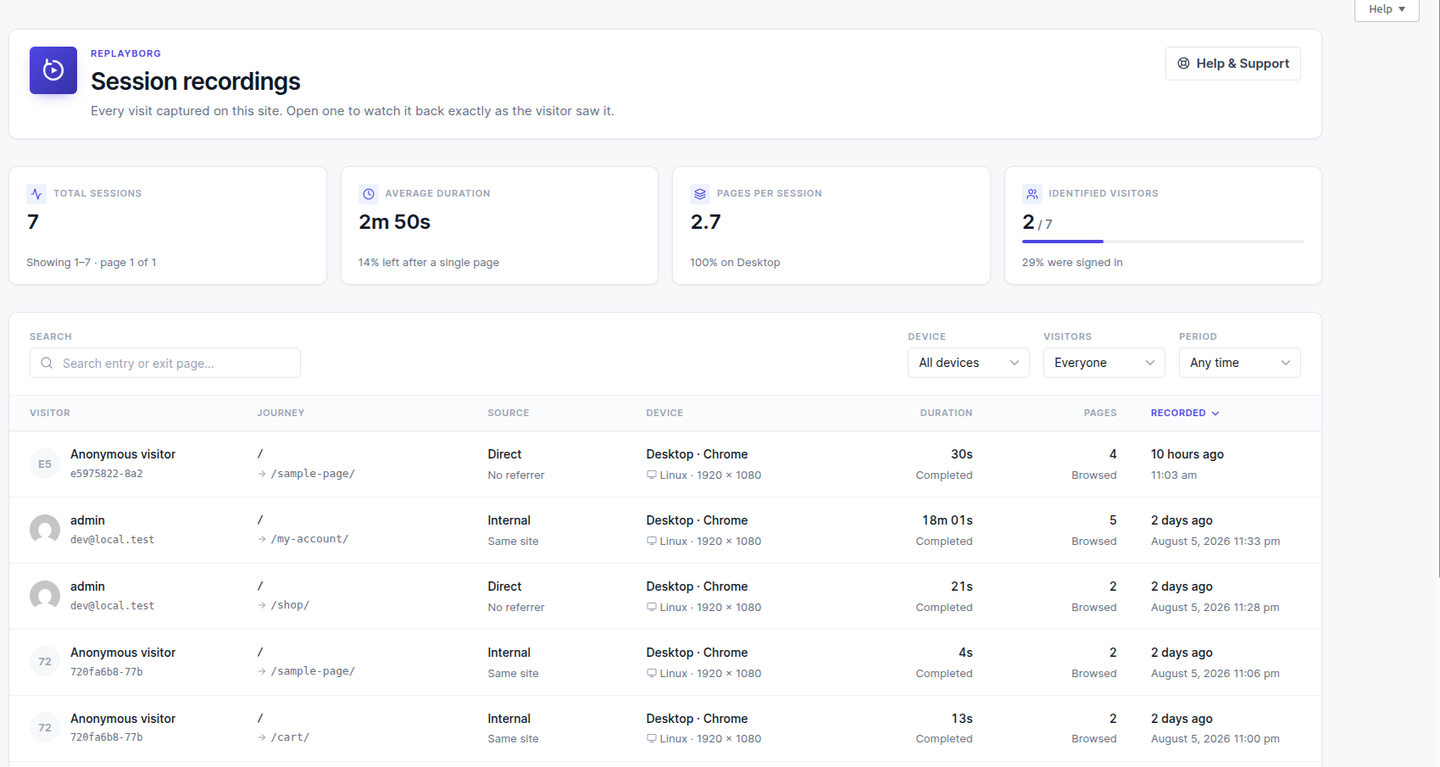
- Session recording — visits are captured with rrweb and stored, GZIP compressed, in your database
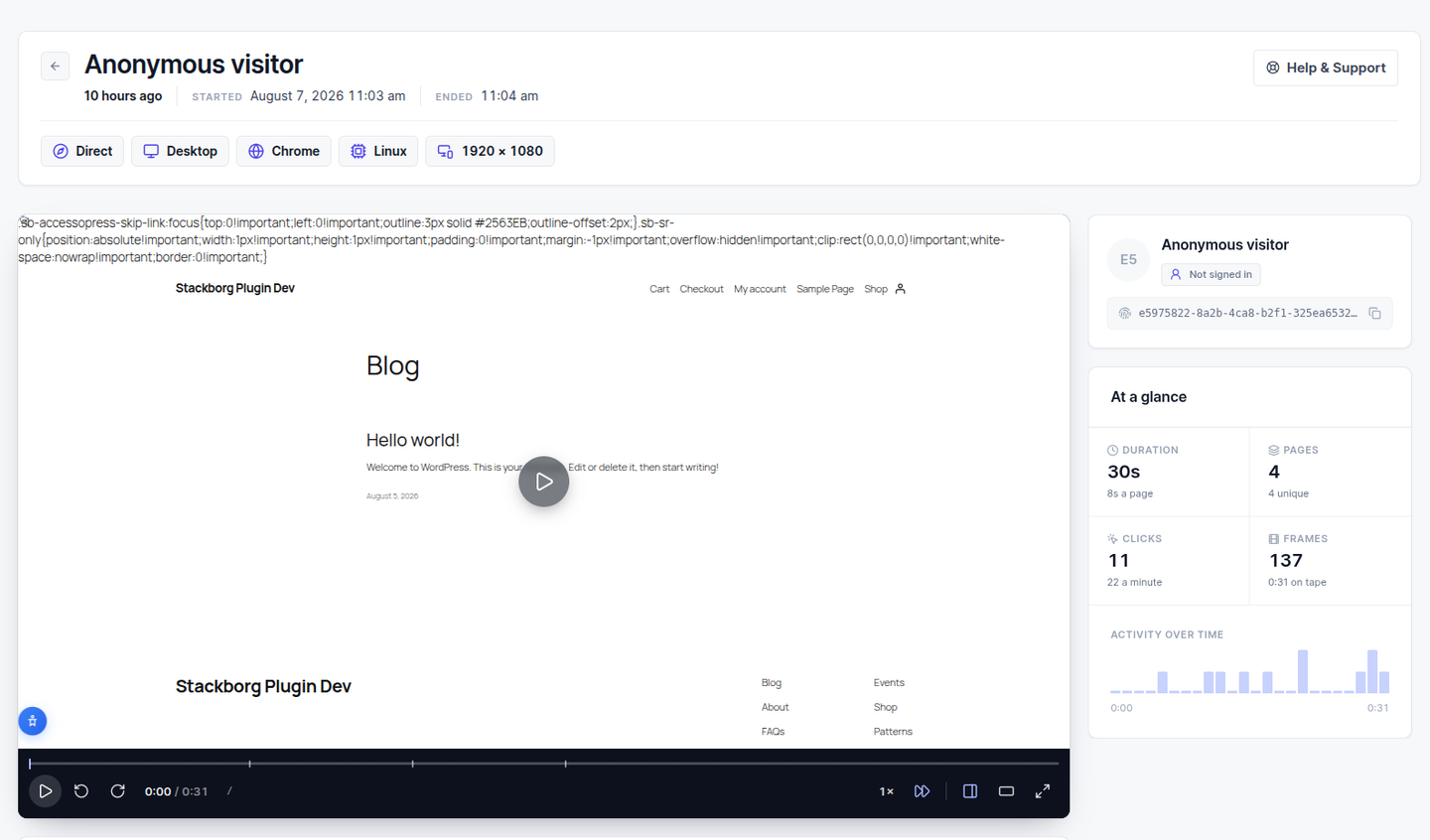
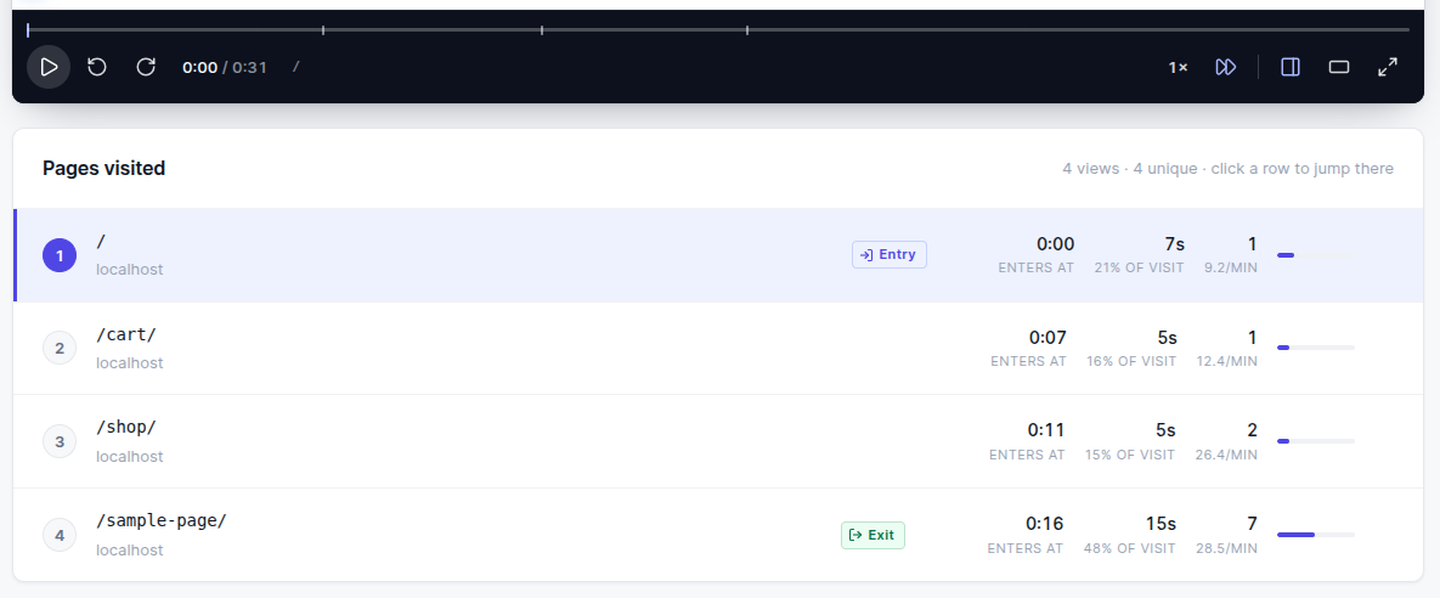
- Session replay — watch a visit back in a player with play, pause, ten-second jumps, speed control and a scrubber marked with each page the visitor opened
- Pages visited — every page in the visit with time on page, clicks, and its share of the session; click any row to jump the player there
- Signed-in visitors — a session made by a logged-in user is attributed to them, with a link to their WordPress profile
- Filtering and sorting — by device, by signed-in status, by date range, or by the page they landed on or left from
- Traffic source — referrer and UTM parameters, recorded with the session
- Retention — recordings older than your retention window are removed automatically by WP-Cron
Documentation and support
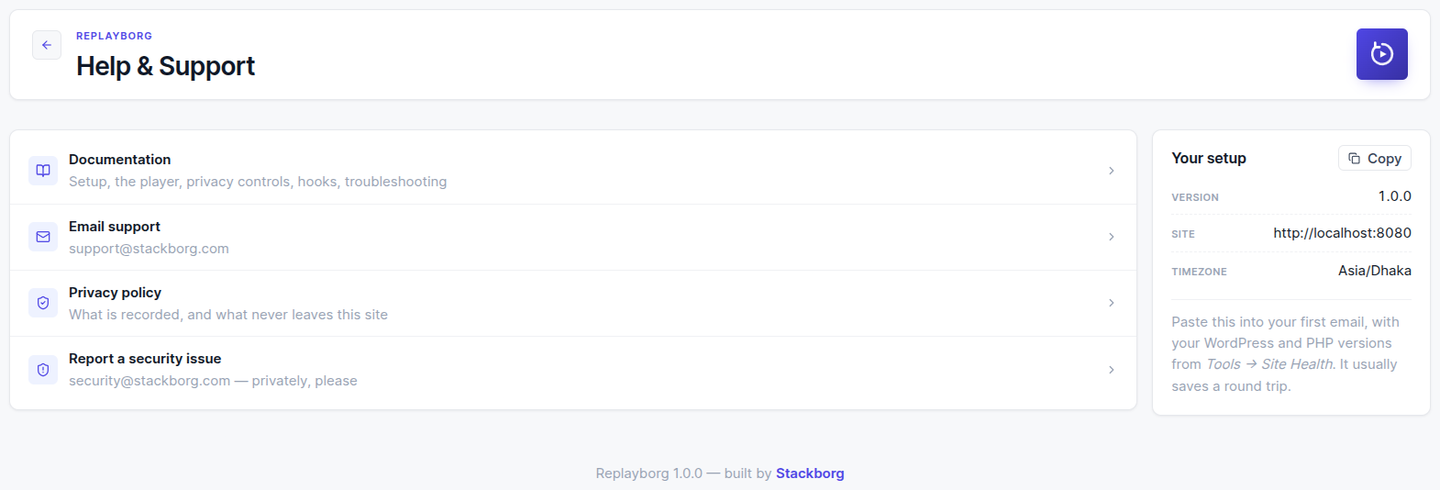
The plugin has its own Help & Support screen: the documentation, the privacy policy, the support address, and the setup details a support email needs, in one place. Every screen links to it from the header.
The full documentation is at https://replayborg-wp-plugin.stackborg.com/ — installation, reading a session, the privacy controls, the hooks, troubleshooting, and the privacy policy.
Built as modules
The plugin is organised so that features arrive as modules that can be switched on without disturbing what is already installed. This first release ships one — sessions. Anything added later slots in beside it, and turning a module off never destroys the data it collected.
Privacy
- No external services. Recording, storage and playback all happen on your own server.
- Inputs are masked by default. What visitors type is not recorded unless you turn masking off.
- Elements can be blocked from recording by CSS selector.
- Sample rate lets you record a percentage of visits rather than all of them.
- No cookies. An anonymous visitor id is kept in localStorage.
- Consent aware. Recording can be held until a consent tool signals agreement.
Session recordings are still personal data in most jurisdictions. Tell your visitors you collect them, in your privacy policy — the plugin adds a suggested passage to WordPress’s own privacy policy guide to help. The full policy, including wording you can adapt, is at https://replayborg-wp-plugin.stackborg.com/privacy
Third-Party Services
SB Replayborg does not connect to any third-party service. All recording, storage and playback happens on your own server, in your own database. No data is transmitted anywhere.
ಸ್ಕ್ರೀನ್ಶಾಟ್ಗಳು
ಸ್ಥಾಪನೆ
- Install SB Replayborg through Plugins Add New, or upload the
sb-replayborgfolder to/wp-content/plugins/. - Activate it through the Plugins menu.
- Open Replayborg in the admin menu. Recordings appear as visitors browse the site.
Nothing needs configuring to start. Administrators are recorded like anyone else; to exclude a role, see the FAQ.
FAQ
-
Does this send my visitors’ data anywhere?
-
No. There is no external service, no API key and no account. Recordings are written to your WordPress database and read back from it.
-
Does it slow the site down?
-
The recorder is loaded once, asynchronously, and sends batches rather than a request per event. Idle stretches produce no data at all.
-
How much database space does a recording use?
-
Events are GZIP compressed, which removes roughly 90% of their size. A five-page visit is usually a few hundred kilobytes. Set a retention window so old recordings clear themselves out.
-
Does it work with caching plugins?
-
Yes. The recorder is a static script with no per-page markup, so a cached page records exactly like an uncached one.
-
How do I stop recording administrators, or any other role?
-
Add this to your theme’s functions.php or a small plugin:
add_filter( 'sb_replayborg_should_record', function ( $record ) {
    return current_user_can( 'manage_options' ) ? false : $record;
} );
Nothing is excluded by default, so that the first thing you do — opening your own site to check recording works — actually shows you a recording.
-
What happens to my data if I uninstall?
-
Everything the plugin created is removed: the recordings, the events, and its settings. Deactivating changes nothing.
-
Which timezone are the times shown in?
-
Yours. Times are stored in UTC and displayed using the timezone, date format and time format from Settings General.
-
Where can I read the documentation?
-
The full guide — setup, reading a session, privacy, hooks and troubleshooting — is at https://replayborg-wp-plugin.stackborg.com/. The plugin’s own Help & Support screen links to it, and every screen links there from its header.
-
How do I get support?
-
Email support@stackborg.com. The Help & Support screen in the plugin has a card that copies your setup details, which usually saves a round trip. Security reports go to security@stackborg.com — privately, please, rather than in public.
-
Is the JavaScript source included?
-
Yes. The two files in
assets/js/are compiled, and their complete TypeScript sources ship inside the plugin, insrc-js/, with the build configuration.cd src-js && npm install && npm run build:allrebuilds exactly what is shipped. No obfuscation of any kind is applied.
ವಿಮರ್ಶೆಗಳು
ಈ ಪ್ಲಗಿನ್ಗೆ ಯಾವುದೇ ವಿಮರ್ಶೆಗಳಿಲ್ಲ.
ಕೊಡುಗೆದಾರರು & ಡೆವಲಪರ್ಗಳು
“SB Replayborg” ಓಪನ್ ಸೋರ್ಸ್ ಸಾಫ್ಟ್ವೇರ್ ಆಗಿದೆ. ಕೆಳಗಿನ ಜನರು ಈ ಪ್ಲಗಿನ್ಗೆ ಕೊಡುಗೆ ನೀಡಿದ್ದಾರೆ.
ಕೊಡುಗೆದಾರರು
“SB Replayborg” ಅನ್ನು ನಿಮ್ಮ ಭಾಷೆಗೆ ಅನುವಾದಿಸಿ.
ಅಭಿವೃದ್ಧಿಯಲ್ಲಿ ಆಸಕ್ತಿ ಇದೆಯೇ?
ಕೋಡ್ ಬ್ರೌಸ್ ಮಾಡಿ, SVN ರೆಪೊಸಿಟರಿ ಪರಿಶೀಲಿಸಿ, ಅಥವಾ ಅಭಿವೃದ್ಧಿ ಲಾಗ್ ಗೆ RSS ಚಂದಾದಾರರಾಗಿ.
Changelog
1.1.0
- A visit is now marked finished by the browser as the page closes, instead of being guessed at from how long the recording has been quiet. A visitor reading a page without touching anything sends nothing at all — which is exactly what a closed tab sends — so guessing got it wrong in both directions.
- Removed nineteen unused files that were shipping inside the package — a set of interface components no screen uses, left over from earlier drafts. Nothing that runs changed.
1.0.1
- Internal: the admin screen’s loading state now comes from the shared library rather than a local override, so it behaves the same here as in every other Stackborg plugin. No change to what the plugin does.
1.0.0
- First release.
- Session recording with rrweb, GZIP compressed into your own database.
- Session replay with play, pause, ten-second jumps, speed control, and a scrubber marked with each page of the visit.
- Pages visited, with time on page, clicks, share of the session, and entry and exit marked.
- Sessions attributed to signed-in WordPress users.
- Filtering by device, signed-in status, date range and URL; sorting by duration, pages or time.
- Referrer and UTM capture.
- Automatic retention cleanup through WP-Cron.
- Module architecture, so later features can be added without disturbing an installed site.
- A Help & Support screen — documentation, privacy policy, support address and copyable setup details — linked from the header of every screen, the Help tab, and the Plugins list row.