
ವಿವರಣೆ
Allows users to change their password from a page (but the admin view)
Donations
ಸ್ಕ್ರೀನ್ಶಾಟ್ಗಳು
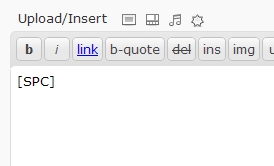
Shortcode example

Form
ಸ್ಥಾಪನೆ
- Download ‘WP-SimplePasswordChange.zip’.
- Unzip it.
- Upload the folder ‘WP-SimplePasswordChange’ directory to the /wp-content/plugins/ directory.
- Activate the plugin through the ‘Plugins’ menu in WordPress.
- Add the shortcode [SPC] in your page content.
- Optionnaly add url=”http://yourredirection.com” in the shortcode. Ex.: [SPC url=”http://www.disney.com”]
FAQ
- How to use the plugin?
-
Create a new page/post, and add the shortcode [SPC]
- How can I redirect the user to another website?
-
use the url parameter in the shortcode. Ex.: [SPC url=”http://www.disney.com”]
ವಿಮರ್ಶೆಗಳು
ಈ ಪ್ಲಗಿನ್ಗೆ ಯಾವುದೇ ವಿಮರ್ಶೆಗಳಿಲ್ಲ.
ಕೊಡುಗೆದಾರರು & ಡೆವಲಪರ್ಗಳು
“wp-simplepasswordchange” ಓಪನ್ ಸೋರ್ಸ್ ಸಾಫ್ಟ್ವೇರ್ ಆಗಿದೆ. ಕೆಳಗಿನ ಜನರು ಈ ಪ್ಲಗಿನ್ಗೆ ಕೊಡುಗೆ ನೀಡಿದ್ದಾರೆ.
ಕೊಡುಗೆದಾರರು
“wp-simplepasswordchange” ಅನ್ನು ನಿಮ್ಮ ಭಾಷೆಗೆ ಅನುವಾದಿಸಿ.
ಅಭಿವೃದ್ಧಿಯಲ್ಲಿ ಆಸಕ್ತಿ ಇದೆಯೇ?
ಕೋಡ್ ಬ್ರೌಸ್ ಮಾಡಿ, SVN ರೆಪೊಸಿಟರಿ ಪರಿಶೀಲಿಸಿ, ಅಥವಾ ಅಭಿವೃದ್ಧಿ ಲಾಗ್ ಗೆ RSS ಚಂದಾದಾರರಾಗಿ.
Changelog
2010/10/05 – v1.1
- Added url as a parameter of the shortcode
2010/08/25 – v1.0
- Initial release